
How to Open an Interactive Brokers Account in 2026?
| Updated: |
(Disclosure: Some of the links below may be affiliate links)
Interactive Brokers is an excellent broker from the United States. It is known for its cheap fees and unique investment product range. It is being used by many personal finance bloggers, for instance.
It is currently the best broker that allows access to U.S. ETFs. And U.S. ETFs are the most efficient ETFs for Swiss investors.
In this guide, I review how to open an Interactive Brokers account. It is not very difficult, but there are a few things you need to know before you start your application. And I also teach you how to optimize your account to save money!
Interactive Brokers

The broker you need to buy stocks and ETFs reliably and at extremely affordable prices. Trade U.S. stocks for as little as 0.5 USD!
- Extremely affordable
- Wide range of investing instruments
So what is Interactive Brokers (IB)?
IB is a brokerage firm from the United States. It was created in 1978 in New York, more than 40 years ago! IB is the largest brokerage firm in the United States and the leading foreign exchange (forex) broker. Interactive Brokers offers access to many instruments, such as stocks, bonds, options, futures, and more.
Interactive Brokers is a very well-known broker with an excellent reputation. It is known to be cheap compared to its competitors. I have already compared IB and DEGIRO in the past. This comparison showed that it is even less expensive than DEGIRO, the broker I used before.
An essential thing with IB is that, by default, they do not lend your shares to other people, such as DEGIRO does by default. But you have the choice, which is good! Indeed, you also can lend shares, and you will get some of the money from the lending.
If you want more information on IB, read my review of Interactive Brokers.
Why open an IB account?
So, why did I open an IB account? It is currently the best broker available to Swiss investors.
There are many reasons to prefer Interactive Brokers over other brokers.
- IB offers access to U.S. ETFs to Swiss investors, while many brokers are not.
- IB has excellent prices.
- IB offers access to many investing instruments.
- IB offers foreign exchanges at an excellent price.
- IB has an excellent reputation.
- IB has good financial strength.
So, we will see how one can create an account on IB.
Create an Interactive Brokers account
First, prepare some time in front of you. The account creation process on Interactive Brokers is not difficult, but it will take some time. You will need to answer a few questions, and you will need to wait a day for your account to be funded.
Interactive Brokers has several entities in Europe. The primary entity is IB UK, but one is in Luxembourg, and one is in Ireland, for instance. For Swiss investors, the best entity is IB UK because they offer access to a Swiss IBAN and give you access to US ETFs. For European investors, it does not make much of a difference.
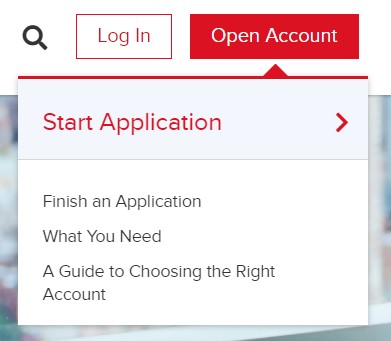
First, go to the account creation page and click “Open account”.
On the first page, you must enter your email, user name, and password for the account. Make sure to choose a good password and user name.
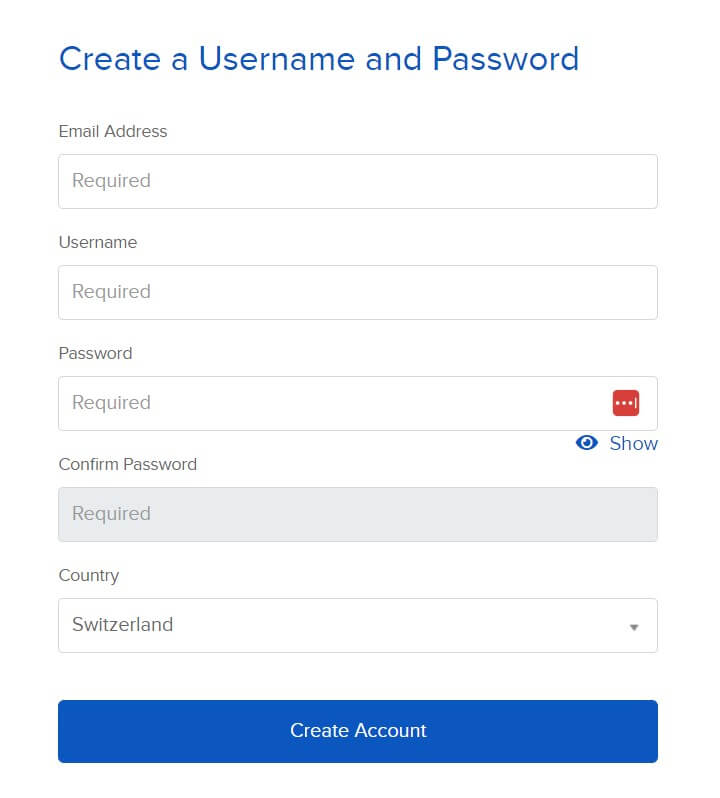
I would recommend making your password at least 20 characters long. A long password is essential to secure your online accounts! Make sure to remember it correctly as well!
You also need to enter your country of residence. If your country of legal residence differs, you must also enter it. You can then confirm the first page.
At this point, they will email you to confirm your email address. Just check your mail and choose to continue the application.
Personal information
On the second page, you will have to set your account type. I put it to Individual for this example. You can check the kinds of accounts to ensure you choose the one according to your needs. But most people will want either an individual or a joint account.
Then, you will have to enter the general kind of personal information. Nothing is special here, only what you are used to entering on each website. You will have to set your addresses as well.
Since this will be related to your taxes, it is essential to enter them correctly. You will also need to enter a valid phone number. IB will use this phone number authentication, so once again, enter it correctly.
IB has several types of accounts. You will need to select the type you want. The primary type of account is a Cash account, which is the type you probably need. A cash account means you must have the money before each trade.
There are also Margin accounts (IB has some good information about margin accounts). Margin means you can use leverage for investing with money you do not have. Unless you know what you are doing, I recommend a Cash account.
Another thing you need to configure when you create an IB account is the base currency. Since I make most of my payments in Swiss Francs (CHF) and live in Switzerland, I chose CHF as my base currency.
You can always convert money from your base currency to any other currency. The base currency only matters for the interface’s display. If you select CHF, you can still transfer USD and buy shares in EUR, for instance.
Currently, the CHF balance has a positive interest rate. If it becomes negative again, you will see a warning about the negative interest rate on CHF balances. You can get the current negative interest rate and limit here.
Now, you will also have to set up three security questions. You will need these questions if you ever need to recover your account. Make sure you select questions from which the answer is not ambiguous (but challenging to find)! This procedure is, once again, a standard procedure.
Investment Questions
After this, you need to answer questions about your finances.
You need to tell how much your net worth is and how much income you have. You also must say what your objectives are for your investments. For instance, you may want to invest for capital appreciation or fixed income. All this information is here for regulatory reasons.
You also have to set which instruments you want to invest in. For instance, if you intend to invest in stocks and bonds, you must select these options. I only selected stocks. Stocks, bonds, options, and futures are among many other choices. You must also select which country (stock market exchange) you would like to invest in.
For each of the instrument you intend to trade in, IB will ask you how much experience you have with it. I would not recommend lying, but I would recommend overestimating your experience. The reason is that if you put zero experience, you will likely not be allowed to trade. So, add a few more trades per year and a few more years of experience if necessary.
In some cases, these questions will be followed by a short investment test for some instruments. You can do it multiple time, so do not be stressed out, this is normal. If you do not know, do not hesitate to use the internet to pass it (or even ChatGPT).
You also need to confirm your phone number with a code.
Confirmations
At this point, you must agree to all the rules IB has for trading. Ideally, you may want to read them. But you probably will not!
If you want, you can also join the Stock Yield Enhancement Program. This program will allow IB to lend your shares to other people. With that, you will receive half of the profits.
Of course, there is a slight risk to that, and you may also be unable to sell your shares when you want or need to. I am not using that feature now. But I have tested this feature recently, and it works well.
At this point, Interactive Brokers will want proof of your identification. For this, you can upload a driving license, an ID card, a passport, or an alien ID card for IB to confirm your identity. You will also have to enter information about your tax status on the same page.
You will also have to fill in information about your employer and job. Usually, you also need to submit something as proof of address.
Fund your IBKR account
IB will fully activate your account once they receive funding.
You need to deposit the first amount for IB to validate your account. First, you have to declare how much money you will deposit. Then, IB will give you all the information necessary for the payment.
Make sure you correctly copy the IBAN. With banking transactions, you should always double-check all banking information before transferring. The transfer will be free since they have a bank account in Switzerland!
And do not forget to include the line indicated by IB with your account number in it. Otherwise, the money will not go directly to your account, and you must contact them to resolve the issue. You must do that for all future deposits to your Interactive Brokers account.
Finalize your account
After you have funded your account, you can still do a few more things.
First, you can configure the market data. You should set your market data status to non-professional. And you should check that you are not buying any market data. Unless you plan to day trade, you do not need this data. You do not want to pay for it.
One great thing is that you have to use two-factor authentication (2FA). You have no choice. You must configure your mobile phone to use it as 2FA.
2FA is an essential part of online security. First, you need to install IBKR Mobile on your phone. This application is available for Android and iOS.
Once you have installed the application, you can register it as a two-factor authentication for your account. You will have to log in with your username and password, and you need to enter the code you received by SMS.
Finally, you can then choose a PIN for your future two-factor authentication. Remember that PIN since you must use it for each connection to Interactive Brokers.
If you do not know about 2FA and why it is necessary, read my article about online personal finance and security.
Wait for your account
At this point, you only need to wait for IB to create and fund your account.
It should not take too long. It only took one day for my account to be created and funded. It is pretty fast. The next day, I could directly make my first trade.
Optimize your IBKR account
Now that you have access to your account, there are two more things to finalize in your account.
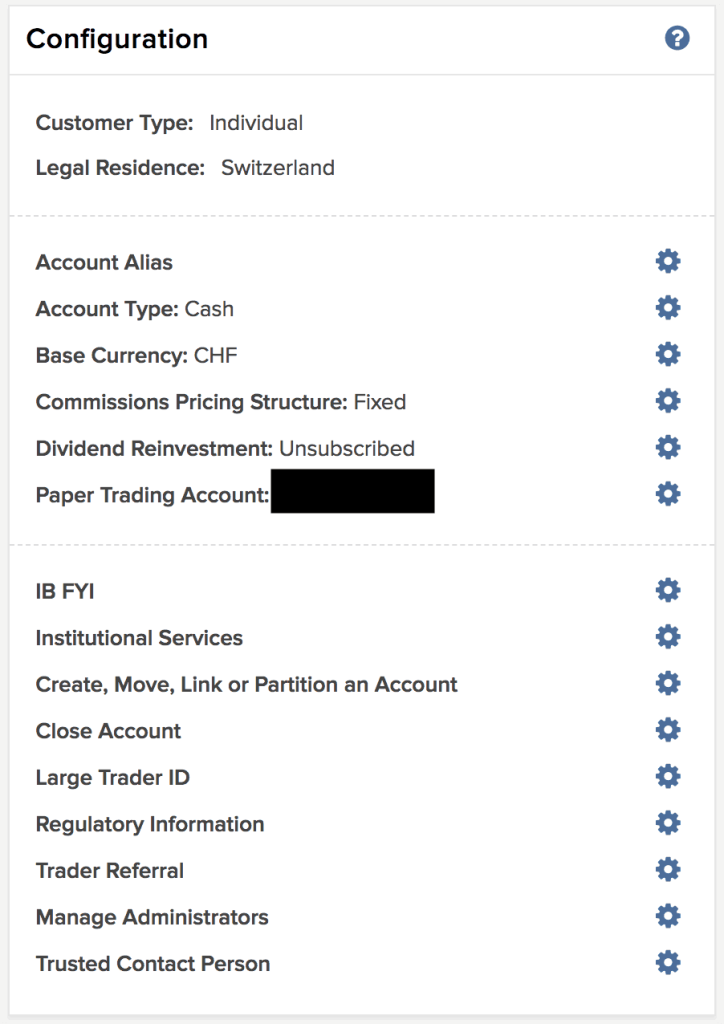
The first thing remaining at this point is configuring the Pricing System. I recommend you use the tiered pricing system. IB is cheaper than DEGIRO when you use the Tiered Pricing system.
You can make the change in your Account Settings. If you prefer the more predictable fixed pricing, you can also opt for it. There are some cases where fixed pricing is cheaper than tiered pricing.
Here are my settings just before I made the change to Tiered pricing:
The second thing applies if you are a Swiss investor and will invest in U.S. ETFs. In that case, you need to fill out the W-8BEN form. That is pretty simple. You can go into your Account Settings. There, you can click on Profile next to your name. Then, you must click the (i) blue button next to your name below Profiles. Then, you can click on “Update Tax Forms”.
They will then take you through the process, and you can fill out the W-8BEN tax form. This form will halve the dividend withholding from your American stocks and ETFs. This step is essential if you want to profit from the great tax efficiency of U.S. ETFs.
Some people have told me that it sometimes takes about one day for the account currency to be changed on the interface. You have to wait one day, and the issue should disappear. In the meantime, you may see some numbers in other currencies (likely GBP).
Another thing you can choose to do is to allow IB to lend your shares. By doing so, you will get 50% of the profits. This feature is called the Stock Yield Enhancement Program. However, there are some risks. I have tried it on and off over the last few years, but whether you think it is worth it is up to you.
Conclusion
The broker you need to buy stocks and ETFs reliably and at extremely affordable prices. Trade U.S. stocks for as little as 0.5 USD!
- Extremely affordable
- Wide range of investing instruments
The procedure is now complete! If you followed this guide, you now have an Interactive Brokers account.
With this great broker, we have access to U.S. Exchange Traded Funds such as VT, which makes the most significant part of my portfolio.
I have now been using IB for more than two years. And I am delighted with IB. Interactive Brokers is the best broker available to Swiss investors.
The next step is now to buy an ETF from Interactive Brokers. It is also relatively simple and only takes a little time.
What do you think about Interactive Brokers? Do you already have an account? If not, which broker are you using?
More reading

Should you use multiple brokers?
Having a single broker is simple, so why would you want multiple brokers? This article outlines multiple reasons why this may be good for you.
Cornèrtrader Review 2026 – Cheap Swiss broker
Honest review of Cornèrtrader, a very affordable Swiss broker: how good is it really? Is it really affordable? We will find out!
DEGIRO vs eToro: Which Is Better For You in 2026?
DEGIRO and eToro are two popular brokers in Europe. Should you choose DEGIRO vs eToro? For which usage? This in-depth comparison helps!
Learn easy ways to optimize your finances and save thousands in Switzerland with our exclusive e-book. Learn about the most cost-effective financial services tailored for savvy residents and expats!
Get Your FREE Swiss Money-Saving Guide
Hello Baptiste.
Thank you so much for this information. I have just opened my account and I’m trying to transfer money now using the QR code provided by IB. However, when I tried to make the transfer from UBS, it says that “the order cannot be executed because the payee’s country is blocked from online payment in “Country restrictions””. The location in the bank account is Greenwich, USA. Have you encountered it before and do you have any advice on how to fix it? Thank you so much.
Hi Liza
No, I have never encountered it before.
Is it a message from your bank or from IB? What bank you are using?
It’s not IB that blocks you but UBS. You need to change in your UBS security settings and choose which countries you are allowed to transfer money to.
IBKR cannot be used as a platform for UK SIPP’s so I will probably go with Interactive Investor for my SIPP and ISA investments.
https://www.ii.co.uk/investing-with-ii/international-investing/markets/switzerland
I just created an Interactive Brokers account in Switzerland and I was going to fund it by transferring some CHF from my Swiss account. I was expecting to see a Interactive Brokers account in the UK but the the QR Bill generated to do the payment shows an account in the US. Why is that? Should I proceed or do I need to change something? Thanks!
Hi Lella
Where did you generate the QR bill?
When I do a payment to IBKR, the address is indeed in the US, in Greenwich. The IBAN should be a CH IBAN.
Thanks so much for this tutorial! Quick question: Can one still create an account even if they don’t have a job currently? I’m just about to finish my studies and I don’t have a job at this moment, but I do have some savings that I want to put to work, so is the step about employer verification a must?
Hi Michael
Good question, and I am not sure about the answer.
I would think you can create an account as long as you have enough wealth. However, the rules are obscure, so you may have to give it a try and see what happens.
Hi Baptiste!
We are planning to open a joint account in IBKR for me and my husband, which from what I learned, it should not be a problem. How is your experience with your joint account? Can both partners access the account from separate mobile phones at different times? (I notice that it sounds like a dumb question, but some banks send an SMS to a specific phone number, or you have to confirm in an app that only allows one mobile phone). Thanks for the answer! Nydia
Hi Nydia
You have proper two-factor authentication with a joint account. So as long as you share the credentials (including 2FA), you will be good to access the accounts from two persons. You can have the 2FA on a computer, so it’s not an issue.
I am based in Switzerland and when Creating an Interactive broker account and I am with the UK entity. I am sure of it because when I ask display a statement from my account I see “IB UK Limited, 20 Fenchurch Street, Floor 12, London”.
So because I have created my Account through UK I was expecting a Swiss IBAN.
Now I see that I have a Germany IBAN because when I do transfers to IB the IBAN starts with DE. What can I do to have a Swiss IBAN? Do I need to close the account and open another one?
I also asked chat GPT that answer me this:
“A Swiss IBAN is not standard for IBKR retail accounts”, it means:
• Interactive Brokers does not normally provide Swiss IBANs for individual (retail) clients, even if you live in Switzerland.
• IBKR uses clearing banks in Germany (DE IBAN) or sometimes other EU countries for EUR and CHF deposits.
• This is because IBKR’s European entities (IBKR Europe in Ireland or IBKR Central Europe in Hungary) do not operate Swiss banking infrastructure for retail clients.
• So, even if you select the UK entity or deposit CHF, the IBAN will still belong to a partner bank outside Switzerland.
In short: having a Swiss IBAN is not an option for most IBKR retail accounts. It’s not about your choice of entity—it’s about IBKR’s banking setup.
Hi Marta
That’s weird, you should have a CH IBAN when you do a CHF transfer. The easiest way to verify is to check whether you have “.co.uk” at the end of your URL when you visit the website.
If you created the account just now, maybe wait 1-2 days; some people reported it could take time for the account to be fully setup.
Otherwise, you should contact the support.
Hi, I got only account number that starts with U.. Are you sure that we get CHF IBAN for bank transfer? I tried that and it says to transfer to that account number showing no IBAN. That looks weird to me and I am not sure if SWIFT transfer would happen – IBKR already mentioned that bank can charge money for this transfer. Can you confirm this please?
Hi lama
Yes, I am pretty sure.
Do you have an IBKR UK account? I am not sure about other accounts.
Are you selecting CHF for the currency of the transfer?
If it’s not CH-IBAN, you are indeed likely going to pay fees.
Thank you. I had to wait a bit to see the QR code to the IBKR provided CHF account number. Thank you. Patience is key ;) First lesson in investing is learned.
I am glad to know this worked in the end.
Hello Baptiste,
I want to add my wife and son name’s as beneficaries incase of unforseen events in life.But i don find it.Could you help me with this. I tried to contact UK number but no one picjs up.I m in swiss.
Thank you for your efforts.
Kelly
Hi Kelly
Good question. I don’t think we can do it on IBKR UK.
For your wife, what you can do is make a joint account so that she already has access.
As for your son, I think he will have to go through standard inheritance proceedings.
Hello,
I am currently trying to open an account as per the instructions in this page. I am stuck at confirm your Tax residence page. Not able to proceed further.
If I click on continue nothing happens. Any support would be much appreciated. Thanks.
Hi Kiran
I have never heard of this issue. Are you sure you filled all the fields?
If yes, here are a few things you can try:
1) Switch to an incognito tab and try again
2) Use a different browser or even a different computer
If this does not work, there is not much you can do but contact the support to get unblocked.
Hello Baptiste,
Thanks. I restarted the computer and tried again it worked.
However , in Review and Sign agreements I see the below message
“Your account does not qualify for day trading. Firms are required to set minimum criteria for day trading accounts and your stated Liquid Net Worth is below that threshold.”
Is that an issue?
Also everytime I access interactive brokers website it takes me UK website (co.uk) , will that be a problem? As in one of the earlier comments I see , for one it was showing GB IBAN and not CH IBAN. Thanks for clarifying.
Hi Kiran
Glad to hear that.
1) That’s not an issue. Day trading means buying and selling the same currency on the same trading day, which is unlikely something you want to do.
2) Yes, co.uk is what Swiss residents should be using, all good!