
Step-by-Step Guide: How to Easily Buy an ETF on Interactive Brokers
| Updated: |
(Disclosure: Some of the links below may be affiliate links)
I have been using Interactive Brokers (IB) for several years. It took me a while to get used to this broker. However, I can now do all the operations I need easily. I will show you how to buy an ETF from start to finish on IB, the easy way!
Many readers were having a hard time starting with Interactive Brokers. It may be a little complicated initially, but it becomes straightforward once you do it. If you follow this guide, you will know how to buy ETFs from IB without issue!
This guide will show you how to buy an ETF directly from the account management interface. And we also see how to deposit money into your account from this interface and even how to convert currencies if necessary. So, we will cover all the steps to make your first investment with Interactive Brokers!
By the end of the guide, you will know exactly how to buy ETFs on IB!
Interactive Brokers Interfaces

The broker you need to buy stocks and ETFs reliably and at extremely affordable prices. Trade U.S. stocks for as little as 0.5 USD!
- Extremely affordable
- Wide range of investing instruments
Interactive Brokers has several different user interfaces:
- Account Management
- Web Trader
- IBKR Mobile
- Trading Workstation (TWS)
- IBKR Desktop
This guide will show you how to buy an ETF from the Account Management interface. This interface is the simplest of all the interfaces. And this interface has all the features you need to buy your first ETF from Interactive Brokers. I have a guide on the different IB interfaces if you want to learn more. But do not worry, you only need one!
This guide will review how to buy the VOO (Vanguard S&P 500) ETF from the Account Management interface. Even though my example will focus on the VOO ETF, the process is the same for any ETF. For instance, I follow the same monthly steps to buy VT (my favorite ETF) and CHSPI (my Swiss ETF).
I will guide you through all the steps. The process starts with transferring the money to IB, converting it to USD, and finally buying the ETF. Of course, if your base currency is USD, you do not need step 2. And if your account is already funded, you do not need the first step either.
I assume that you already have an Interactive Brokers account. If you do not have one, you can read my guide on opening an Interactive Brokers account. And then, you can come back once you have created your account!
Usually, there should not be differences between the entities, but I recommend using the IB UK entity for Swiss investors.
The Best Interactive Brokers interface
The Account Management interface is the default interface of Interactive Brokers. This interface allows you to do everything you need:
- You can visualize your portfolio and see your investing performance.
- You can do basic trading. However, some of the advanced options for trading are not available from this interface (but we do not need them anyway).
- You can request a transfer of funds.
- You can generate reports of your activity or results.
This interface is excellent for most tasks. This interface is the only one I use for investing with Interactive Brokers. You should not fall into the trap of using a more complicated interface to do simple tasks.
To open this interface, you can go to the Interactive Brokers website. From there, you can click on the red Login button.
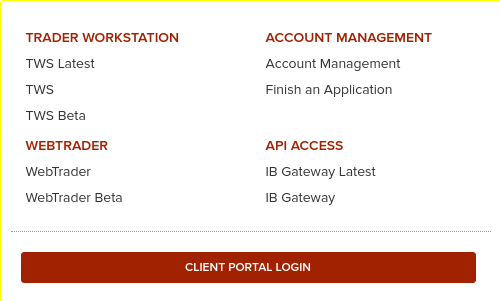
Go to the Client Portal Login or the Account Management link to access Account Management. They both do the same thing. You will need to enter your account name and password. And you will also need to use your phone for two-factor authentication.
Transferring money to Interactive Brokers
If you do not have enough money to make the trade you want, you must first fund your account. For example, you want to transfer 5000 CHF to your IB account.
There are two steps in this process:
- First, create a new deposit method.
- Then, declare an incoming transfer from a deposit method.
The first step is only necessary if you have never made a transfer from this source. If you already did it, you can skip it. We should see how to do both of the steps.
1. Create a new deposit method
On Interactive Brokers, you must first declare the transfer’s source.
It is only necessary to do this once for each source. You can have many sources in many different currencies. However, the source of the deposit must be an account in your name. But it does not have to be in the same currency as your account currency. This is highly convenient to fund your account from different sources.
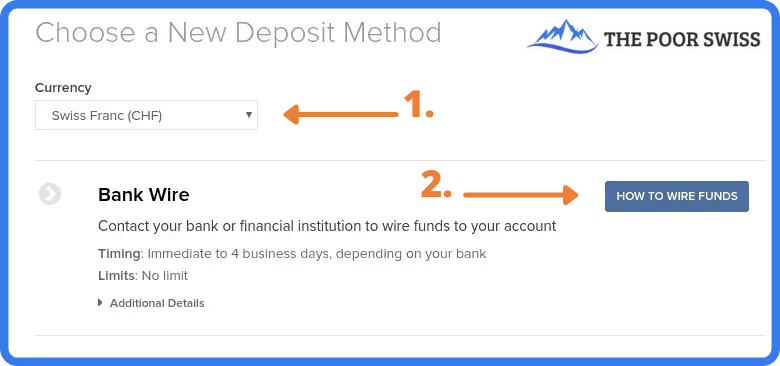
To access this view, go to Menu > Transfer & Pay > Transfer Funds. If you want to declare a new source, click on How to wire Funds. Then, you must fill in some information about this deposit method.
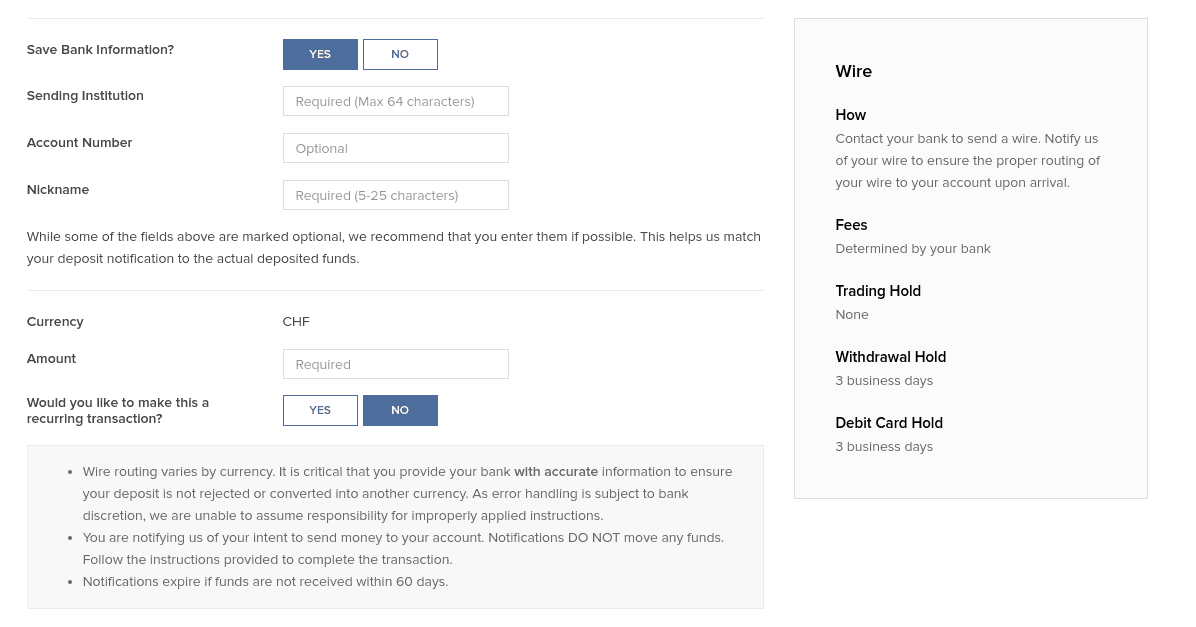
Make sure to double-check all the information. IB will use this information to associate the incoming funds to your account. If something does not match, the fund transfer may be delayed.
2. Declare a new wire transfer
Once you have created your deposit method, you must declare a new transfer from this method. You will have to do that every time you do a transfer.

Return to the Transfer Funds view and select one of the deposit methods. You should have one for each bank account from which you plan to send money to IB.
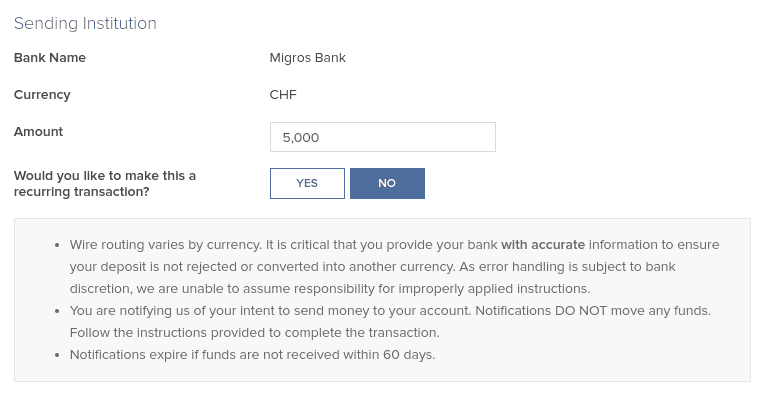
Once you have set the correct amount you intend to transfer (5’000 CHF in my example), you can continue, and Interactive Brokers will give you all the information for the bank transfer.
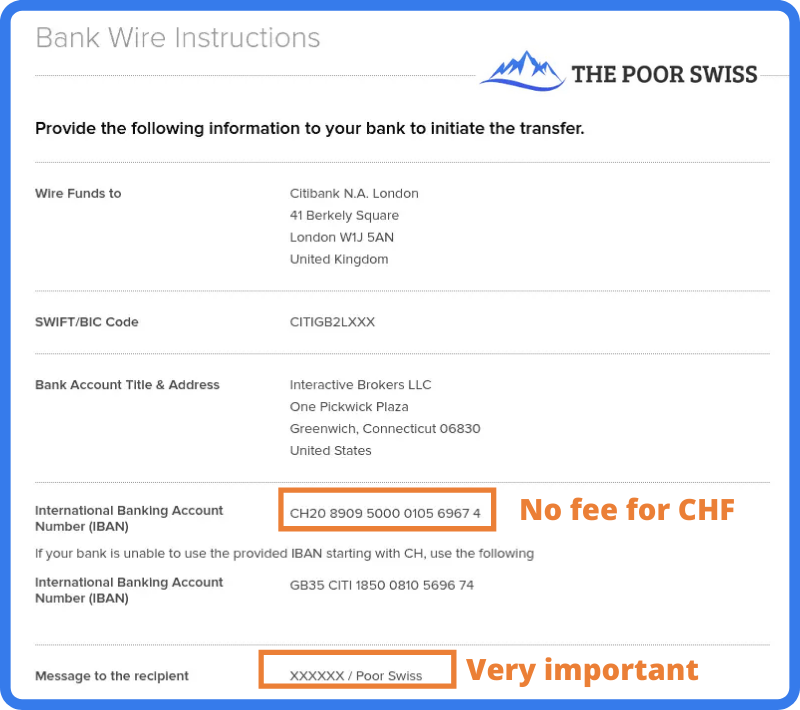
This view should give you all the necessary information to perform the wire transfer from your bank. Be careful about setting the correct message to the recipient. This message should contain your account number and your name.
This information is what Interactive Brokers will use to identify the transfer. If you do not use the correct information, the transfer may take a while to be processed and returned to your bank account.
You can then initiate the transfer from your bank. If you transfer CHF, use the CH IBAN (IB should present it by default). That way, the transfer will be entirely free. Once you initiate the transfer, reaching IB may take a few days. But, generally, it is pretty fast. When my bank executes the transfer, I usually see the money in my IB account the same day.
You may be assigned another IBAN (from Credit Suisse) to wire money to your account, depending on when you created your account. This other IBAN is also a CH IBAN you can transfer to without fees. In this case, follow the instructions given to you by IB.
Convert currency from Account Management
Since April 2024, you do not have to convert currency directly. Indeed, if you have a cash account, IB will automatically buy the currency you need from your base currency. If you want a little more control, you can do the conversion yourself.
If you plan to buy an ETF in another currency, you will first have to buy this currency. It is straightforward to do so from the account management interface.
You can go into the menu and click on Convert Currency.
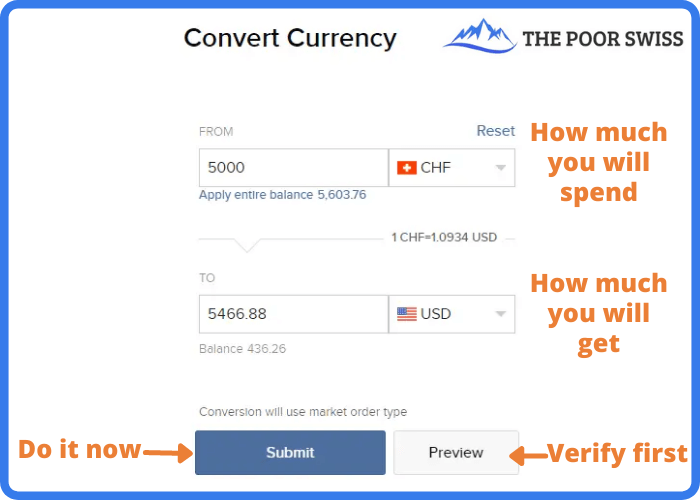
In this view, you can choose which currency you want to convert and into which currency. Next, enter the amount you want to convert and click Submit. Interactive Brokers will then generate an order for you on the forex market. And once this order is executed (generally instantly), you will get your USD.
If you want more control, there is another way to convert currency. You can buy currency like you buy shares (see next section). For instance, you can purchase shares in USD.CHF, which means buying some USD with some CHF. If you want to buy USD with EUR, you can look for USD.EUR. If you want to buy EUR with USD, you can trade for EUR.USD. You get the idea!
This method will give you more options. But in most cases, the simple conversion will work nicely. I only use the default currency conversion method since it is simpler and saves time.
Buy an ETF on Interactive Brokers
Once you have enough cash in the correct currency, you can buy some VOO ETF shares (or any other ETF). You can use the search function from the top right of the interface.
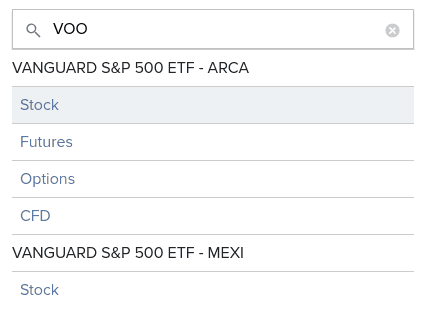
You can type VOO or the name of any other ETF you wish to buy shares from and type Enter. Interactive Brokers will propose several options (Stock, Futures, Options, and Contracts For Difference (CFD)). ETFs are listed as Stock. And sometimes, you will also see several exchanges. Here, we want the Stock on the ARCA exchange.
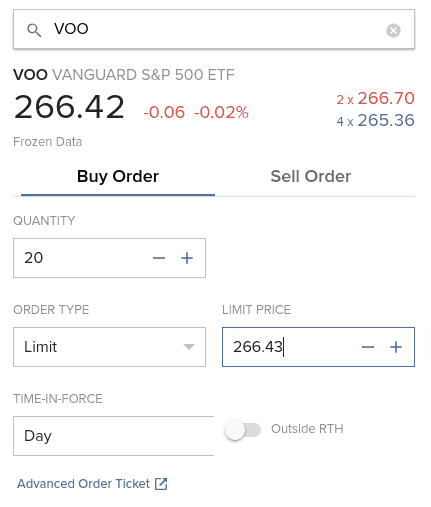
If all these values confuse you, do not worry! Here is what they mean:
- 266.42 is the current market price.
- -0.06 is the last change of the market price in absolute value.
- -0.02% is the last change of the market price in percent.
- In red, you will find the ask volume and the ask price (266.70)
- In blue, you will find the bid volume and the bid price (265.36)
And the fact that it is written Frozen Data is because I did not pay to get real-time data for this particular market. Or it could also mean that I am trading out of hours. If you are a passive investor like me, you only need to worry about the current price. You can ignore all the other information.
Then, you can set the amount you want and the Limit price. Since it is a trade, you can use several order types: Market, Limit, Stop, and Stop Limit. If you are trading with a popular ETF, you can use a Market order.
The execution on IB is good enough that you will not have issues with market orders. Otherwise, you can use Limit Orders. You can set the Limit price based on the current data. But be careful about not trying to optimize too much.
I only use Market Orders. They are simple and not nearly as inefficient as some people think.
You can also set the duration of the order. Either the order is valid only today or Good Till Cancel (GTC). If you want to learn more about these options, I wrote an entire article about stock market order types.
I would advise using the Preview option to ensure you want this operation.
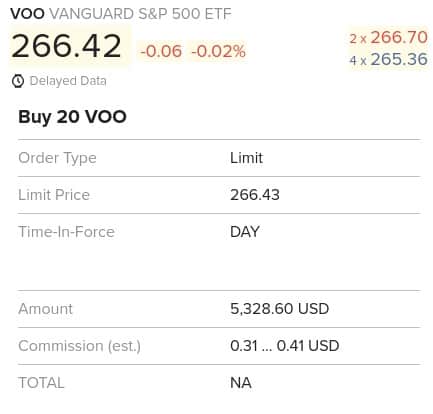
This view will give you all the information you want about the order. You need to pay special attention to the amount and the commission.
For instance, I would have paid 5328.60 USD for the purchase of 20 shares, and I would have only paid fees between 0.31 and 0.41 USD (yes, IB is that cheap!). Once satisfied with your order, click Submit to validate it and wait for it to be executed.
If you use a market order and the stock exchange is open, IB will instantly execute. IB will execute a limit order based on the price you set. If you set a price higher than the current price, it will also be executed instantly.
Congratulations, you now have shares of your ETF! You can follow this simple every month and be on your way to using the stock market for great returns!
Warnings from Interactive Brokers
When you trade with IB from the Account Management interface, you may encounter several warning popups on your screen. You will get used to it. But when you are starting to invest, it can be overwhelming. So, here is what the biggest warnings mean.
And do not forget to click the check box to avoid seeing them again!
Warning about not enough cash settled
Occasionally, you will get a warning saying you do not have enough settled cash on your account.
If this happens, you likely have to wait until your cash is settled. In the US, it takes a few days for cash to be available. If you have a margin account, you can directly use your deposit, but if you have cash account like most people, you will have to wait until settlement.
If you want to learn more, I have an article about cash settlement on IB.
Warning about small currency transactions
The first warning is when you do a small currency transaction below 25’000 CHF.
In that case, IB will tell you that the order is too small to use IDEALPRO and FXCONV instead. You do not need to worry about that! They are just two different routing systems.
For orders below 25’000 CHF, IB will not guarantee interbank exchange rates. So, you may be getting a slightly worse deal. But the difference is negligible enough that you do not have to worry about it. I have converted many times small amounts with IB without any issues.
Warning about lack of real-time data
The second warning that could pop up is when you buy an ETF without real-time data.
If you are like me, you will not have paid the monthly fee to get real-time prices. Passive investors do not need real-time pricing! The prices you see in the interface are delayed by 15 minutes. If you need real-time data, you can always look at Google Finance to see them.
So once again, do not worry about this warning.
Warning about price caps
The third warning is about mandatory price caps. This warning is probably the least obvious of the three.
In 2016, Interactive Brokers started implementing price caps for market orders. It means that a limit order with a price significantly different from the market price cannot be executed even though it would be valid otherwise. IB uses its way of setting price caps to decide what is fair and what is not.
For instance, if a stock trades at a market price of 100 USD and you open a buy limit order at 50 USD, IB will not take this limit order into account to execute against other market orders.
Thus, using price caps on market orders is simply a protection for investors using market orders. This protection is good for honest investors like you and me.
Once again, you can safely ignore this warning.
FAQ
How much does it cost to convert currency on IB?
Converting currency manually will cost 0.002% of the conversion, with a minimum of 2 USD. Unless you are converting very high amounts, you can assume that you will pay 2 USD per conversion. For medium to considerable amounts, this is very cheap. But you should avoid converting tiny amounts.
Are the fees the same for each IB interface?
Yes. There are multiple ways to trade with IB, but the fees are the same on each of them.
Conclusion
The broker you need to buy stocks and ETFs reliably and at extremely affordable prices. Trade U.S. stocks for as little as 0.5 USD!
- Extremely affordable
- Wide range of investing instruments
Now, you are already done! You will now have more shares of the VOO ETF (or any other ETF you want to buy). The entire process is the same for any other ETF. You have to change the name you are searching for, and if it is available in Interactive Brokers, you can buy it.
It is straightforward to trade from the Account Management interface. You can do all the basic investing tasks from this interface. Likely, most simple investors will never need any other interface.
As you can see, you can do much from the Account Management interface. Even though its name talks only about managing your account, it can do much more than that! You can do most things on this interface.
Of course, there are a few limitations. For instance, some Interactive Brokers order types are not available. But that is not an issue for simple passive investors. The account management interface is the only one I use, and I never found anything missing. I invest every month using this interface.
For beginners with Interactive Brokers, I recommend using the Account Management interface. Once you are more familiar with it, and if you are interested, you can start exploring the other interfaces. But you can go your whole investing life only using this single interface.
To streamline your investing, you may consider automating your investments with Interactive Brokers. With that technique, you will have almost nothing to do to invest each month.
If you prefer trading from your mobile, you can buy ETFs from the IBKR Mobile Application. Or, if you need additional information on this broker, read my review of Interactive Brokers.
Do you have any questions on how to use IB? Do you have any tips for the Account Management interface?
More reading

Step-by-Step Guide: How to buy an ETF with Swissquote in 2026
All you need to know about buying ETFs and converting currencies on Swissquote. This guide will make your experience straightforward.
DEGIRO vs Interactive Brokers for European Portfolio: Who is cheaper in 2026?
In-depth analysis of who is cheapest: DEGIRO vs Interactive Brokers. We are considering European investment portfolios for Swiss and European investors.
How to buy an ETF from IBKR Mobile
Trade on the go. A step-by-step tutorial on how to buy an ETF using the Interactive Brokers (IBKR) mobile application.
Learn easy ways to optimize your finances and save thousands in Switzerland with our exclusive e-book. Learn about the most cost-effective financial services tailored for savvy residents and expats!
Get Your FREE Swiss Money-Saving Guide
Dear Mr Poor Swiss,
I am not sure why but when planned a fund transfer to IB I do not get the Wire funds to City bank UK but instead to Credit Suisse in Zurich… Should I be worried I did not select something correct or could it be a change due to Brexit? Many thanks!
Hi Tara,
Excellent point. I have just checked on my account and I also see Credit Suisse. I will have to update the article. No need to be worried!
Thanks for letting me know!
Thank you so much for the confirmation Mr The Poor Swiss, much appreciated :)!
Dear Mr. The Poor Swiss,
Thank you for all your insights and your hard work. I wanted to let you know that thanks to you I started to invest now rather then later. For testing purposes, my first deposit on IBKR was a very small amount in CHF. I was able to convert from CHF to USD for a fixed 2$ fee (which is ok I guess for bigger amounts of money). After the exchange I went back to my balance page and I see 3 fields. CHF cash, USD cash and total Cash. Can you please explain how is it possible that total Cash is less thant USD cash? And the funny thing is that the liquidity is my total Cash which again is less than USD cash (the value that I expected after exchange)
Yours,
Gabriel
Kind Regards,
Gabriel
Hi Gabriel,
I am glad my content is helpful to you!
Without seeing the numbers, I can think of only two ways:
* The total cash is probably in CHF, so USD can be converted to a lower amount of CHF
* The total cash only takes settled money into account and money can take a few days to settle
Hi, Mr. Poor Swiss!
Thank you for your great articles! May I ask if you also use IB to purchase your Ishares Core SPI ETF? Also, do you tend to wait for the good prices/market corrections when you top up your portfolio with the ETFs, or do you do it on regular basis regardless the price? It seems that the market is overheated nowadays and I have serious concerns about entering the market at the current prices .
Regards,
Alla
Hi Alla,
Yes, my entire portfolio is at IB. No, I do not wait for investing. When my salary arrives, I pay my bills and transfer the leftover to my brokerage account and I invest it the next day.
The stock market is very high indeed, but if you invest for the long-term, this should not matter much.
Hi Mr. The Poor Swiss,
and thanks for the post an more generally for your blog that’s really interesting and useful and easy explained. I experienced an issue in buy a leveraged ETF the FNGU. In particular I get the error: “ORDER IS NOT ACCEPTED due to Rule871m for FNGU”
From what I`ve seen it should have to do with being taxed in US which is not my case being resident in CH, but I could not find anything in the account setting neither in the IB documentation page. Do u have any experience with this issue?
Danke im Voraus für deine Hilfe!
Grüss
Luca
This Rule is about not letting people avoiding U.S. dividends withholding. It applies to you since this rule applies to non-us citizens. But I do not know how it applies to this ETF.
I do not invest in complicated instruments such as this one.
You would have to ask IB about it.
Hi mate, reading about currency exchange in IBRK and noticed this sentence you wrote “The first is when you do a small currency transaction, below 25’000 CHF. In that case, IB will tell you that the order is too small to be using IDEALPRO and will use FXCONV instead. You do not need to worry about that! They are just two different routing systems. You may have a very slight difference in market price between both. But I have never seen a significant difference. And FXCONV will create some virtual positions for you in your portfolios”
<– not sure if this above is true. The 25000 limit is for your trade to go through the interbank market (the eFX platforms of the big investment banks in London). In practice, even amounts below 25k will go through smoothly and at the same cost (see this link about odd lots – the final cost may be a little bit higher for amounts below 25k https://ibkr.info/node/1459)
I also talked with a guy who uses the platform for many years and he said that Ideapro and fxconv in terms of cash is exactly the same. Ideapro (not fxconv as you say!) will add a virtual FX position in the Portfolio window but you can take it out manually if you click on Account and go to Virtual FX Position section and you put it to 0.
I am not 100 % sure about nuances between fxconv and idealpro, but in the end it seems they will do the same, one of them adding virtual FX position (and it seems that this is idealpro, not fxconv). Also, you can use fxconv only from TWS (not from ucstomer portal) and idealpro from both.
Hi small_potato,
Thanks for pointing that out. I will fix the part about virtual FX positions.
In the end, it does not change the fact that both are doing the same thing but that you may be getting slightly worse prices when below 25K.
So, I think we can safely ignore this warning, don’t you think?
Thanks a lot for your explanation. Today I did my first trade thanks to you.
I was just wondering what would happen if you do not have enough funds at the end of the month to cover the monthly 10 chf fee, any experience?
Cheers
Hi Facu,
That’s a good question. I have tried to find the information on IB’s website and did not find it.
I would expect that if you do not have enough funds, they are allowed to sell some of your shares to cover the fee. And if you have neither fund nor sellable shares, they are allowed to close your account.
I was never in this situation, but I would expect them to contact such accounts before doing anything drastic.
But if you want the exact answer, you’ll have to contact them.
Thanks for stopping by!
Thank you for the great explanation, I just bought my first ETF following your tutorial! One thing is not clear to me: do I have to keep some cash in my IB cash account (e.g 100 CHF) for fees, e.g. monthly 10 CHF fee, or can I use all my currency to buy as many ETF as possible?
Hi Peter,
You need to have enough cash to cover the 10 CHF monthly fee.
Hi Mr. Poor Swiss
I have a question for you regarding the permission to trade US Funds. I am an Italian citizen living in Switzerland, do I have the permission to trade US ETFs? On IB I can only select “non american” Investmentfonds, additionally I cannot find any of the UCITS ishares ETFs I wanted to invest in. Thanks for support!
Regards
Hi Elias,
If you are a Swiss resident and are paying your taxes only in Switzerland, you should be able to invest in U.S. ETFs indeed.
As for UCITS ETFs, they should be available as well in IB.
If you want sure information, you would have to contact IB’s support.
Thanks for stopping by!
Hello Mr. Poor Swiss,
Can you please tell me, how can i find the list of ETFs and other stocks available in IB?
I thank you very much for responding.
Hi Azmarino,
IB gives you access to all major stock exchanges in the world. So, you have access to all ETFs available in all these stock exchanges. That’s thousands of ETFs. You can find many of these on Morningstar.
Thanks for stopping by!
Hi TPS,
Thanks for your article, it’s very helpful.
Buying USD.CHF means buy USD with CHF. Does selling CHF.USD mean sell CHF to get USD? Wondering if both operations get the same result and if there’s any difference or impact.
Hi Kelly,
I believe you are correct. I am not they have all the currency pairs available like this. But in theory, buying USD.CHF should be the same as selling CHF.USD. I think that both operations wil have the same reslt. But I have never tried selling CHF.USD.
I think that buying USD.CHF is more intuitive for many people since that means you are really buying USD with a price in CHF.
But they should be equivalent.
Thanks for stopping by!