
Step-by-Step Guide: How to Easily Buy an ETF on Interactive Brokers
| Updated: |
(Disclosure: Some of the links below may be affiliate links)
I have been using Interactive Brokers (IB) for several years. It took me a while to get used to this broker. However, I can now do all the operations I need easily. I will show you how to buy an ETF from start to finish on IB, the easy way!
Many readers were having a hard time starting with Interactive Brokers. It may be a little complicated initially, but it becomes straightforward once you do it. If you follow this guide, you will know how to buy ETFs from IB without issue!
This guide will show you how to buy an ETF directly from the account management interface. And we also see how to deposit money into your account from this interface and even how to convert currencies if necessary. So, we will cover all the steps to make your first investment with Interactive Brokers!
By the end of the guide, you will know exactly how to buy ETFs on IB!
Interactive Brokers Interfaces

The broker you need to buy stocks and ETFs reliably and at extremely affordable prices. Trade U.S. stocks for as little as 0.5 USD!
- Extremely affordable
- Wide range of investing instruments
Interactive Brokers has several different user interfaces:
- Account Management
- Web Trader
- IBKR Mobile
- Trading Workstation (TWS)
- IBKR Desktop
This guide will show you how to buy an ETF from the Account Management interface. This interface is the simplest of all the interfaces. And this interface has all the features you need to buy your first ETF from Interactive Brokers. I have a guide on the different IB interfaces if you want to learn more. But do not worry, you only need one!
This guide will review how to buy the VOO (Vanguard S&P 500) ETF from the Account Management interface. Even though my example will focus on the VOO ETF, the process is the same for any ETF. For instance, I follow the same monthly steps to buy VT (my favorite ETF) and CHSPI (my Swiss ETF).
I will guide you through all the steps. The process starts with transferring the money to IB, converting it to USD, and finally buying the ETF. Of course, if your base currency is USD, you do not need step 2. And if your account is already funded, you do not need the first step either.
I assume that you already have an Interactive Brokers account. If you do not have one, you can read my guide on opening an Interactive Brokers account. And then, you can come back once you have created your account!
Usually, there should not be differences between the entities, but I recommend using the IB UK entity for Swiss investors.
The Best Interactive Brokers interface
The Account Management interface is the default interface of Interactive Brokers. This interface allows you to do everything you need:
- You can visualize your portfolio and see your investing performance.
- You can do basic trading. However, some of the advanced options for trading are not available from this interface (but we do not need them anyway).
- You can request a transfer of funds.
- You can generate reports of your activity or results.
This interface is excellent for most tasks. This interface is the only one I use for investing with Interactive Brokers. You should not fall into the trap of using a more complicated interface to do simple tasks.
To open this interface, you can go to the Interactive Brokers website. From there, you can click on the red Login button.
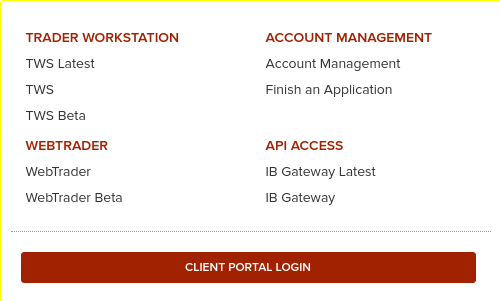
Go to the Client Portal Login or the Account Management link to access Account Management. They both do the same thing. You will need to enter your account name and password. And you will also need to use your phone for two-factor authentication.
Transferring money to Interactive Brokers
If you do not have enough money to make the trade you want, you must first fund your account. For example, you want to transfer 5000 CHF to your IB account.
There are two steps in this process:
- First, create a new deposit method.
- Then, declare an incoming transfer from a deposit method.
The first step is only necessary if you have never made a transfer from this source. If you already did it, you can skip it. We should see how to do both of the steps.
1. Create a new deposit method
On Interactive Brokers, you must first declare the transfer’s source.
It is only necessary to do this once for each source. You can have many sources in many different currencies. However, the source of the deposit must be an account in your name. But it does not have to be in the same currency as your account currency. This is highly convenient to fund your account from different sources.
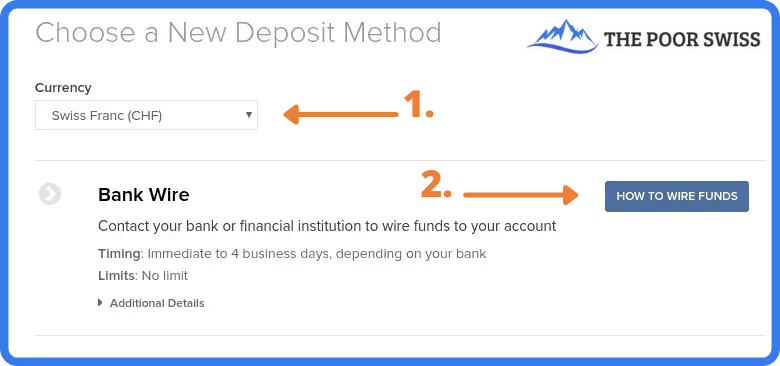
To access this view, go to Menu > Transfer & Pay > Transfer Funds. If you want to declare a new source, click on How to wire Funds. Then, you must fill in some information about this deposit method.
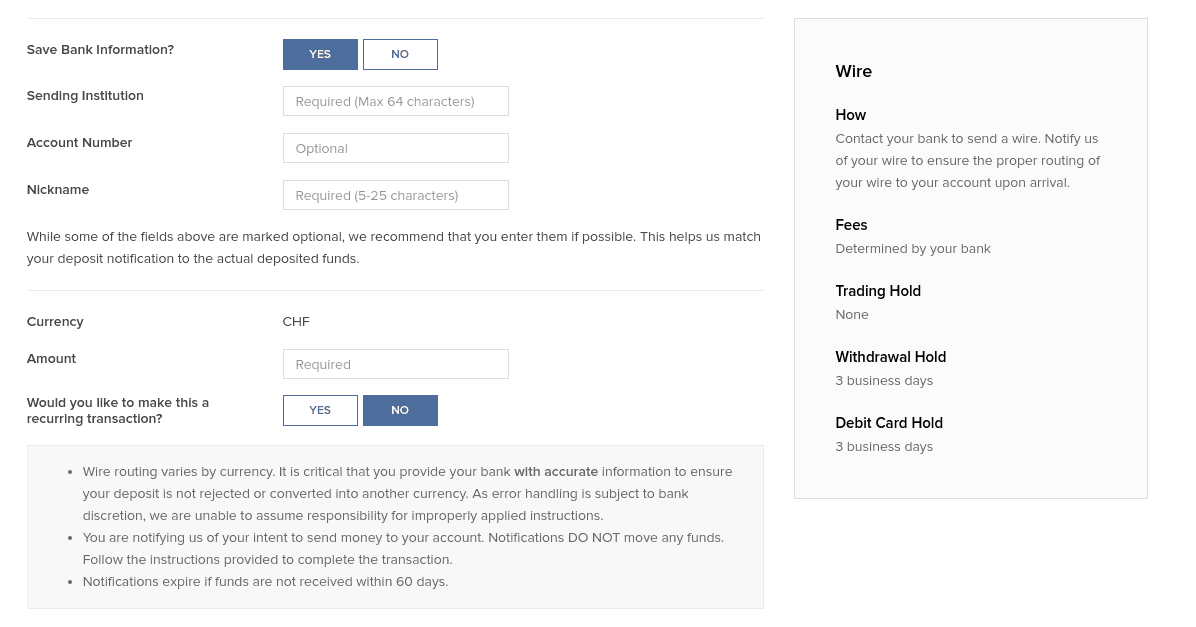
Make sure to double-check all the information. IB will use this information to associate the incoming funds to your account. If something does not match, the fund transfer may be delayed.
2. Declare a new wire transfer
Once you have created your deposit method, you must declare a new transfer from this method. You will have to do that every time you do a transfer.

Return to the Transfer Funds view and select one of the deposit methods. You should have one for each bank account from which you plan to send money to IB.
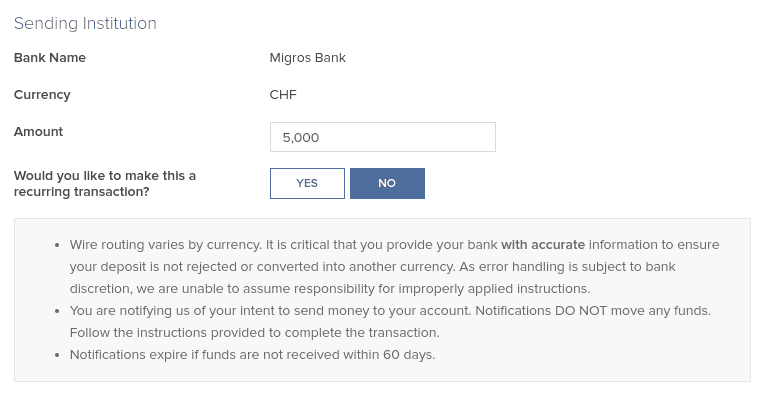
Once you have set the correct amount you intend to transfer (5’000 CHF in my example), you can continue, and Interactive Brokers will give you all the information for the bank transfer.
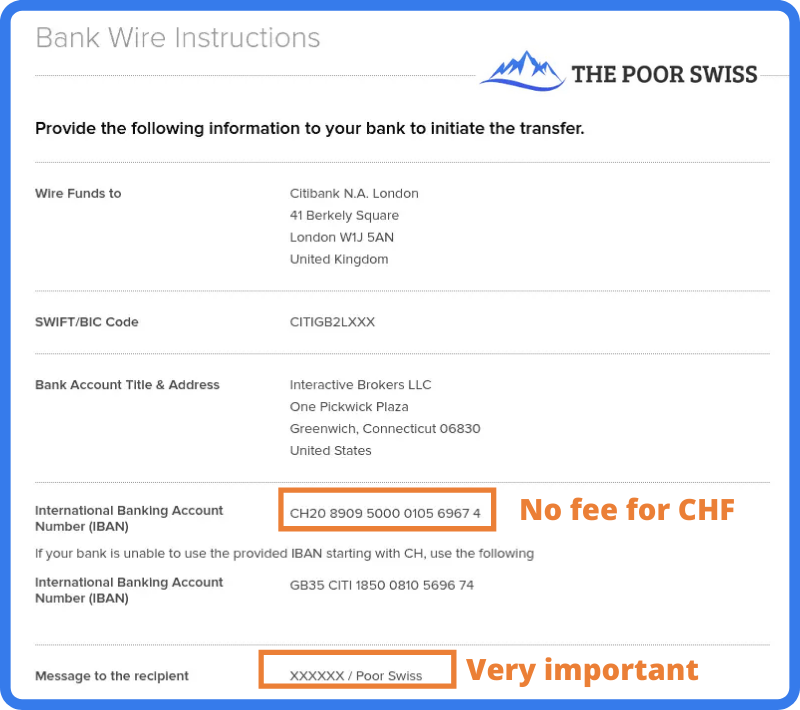
This view should give you all the necessary information to perform the wire transfer from your bank. Be careful about setting the correct message to the recipient. This message should contain your account number and your name.
This information is what Interactive Brokers will use to identify the transfer. If you do not use the correct information, the transfer may take a while to be processed and returned to your bank account.
You can then initiate the transfer from your bank. If you transfer CHF, use the CH IBAN (IB should present it by default). That way, the transfer will be entirely free. Once you initiate the transfer, reaching IB may take a few days. But, generally, it is pretty fast. When my bank executes the transfer, I usually see the money in my IB account the same day.
You may be assigned another IBAN (from Credit Suisse) to wire money to your account, depending on when you created your account. This other IBAN is also a CH IBAN you can transfer to without fees. In this case, follow the instructions given to you by IB.
Convert currency from Account Management
Since April 2024, you do not have to convert currency directly. Indeed, if you have a cash account, IB will automatically buy the currency you need from your base currency. If you want a little more control, you can do the conversion yourself.
If you plan to buy an ETF in another currency, you will first have to buy this currency. It is straightforward to do so from the account management interface.
You can go into the menu and click on Convert Currency.
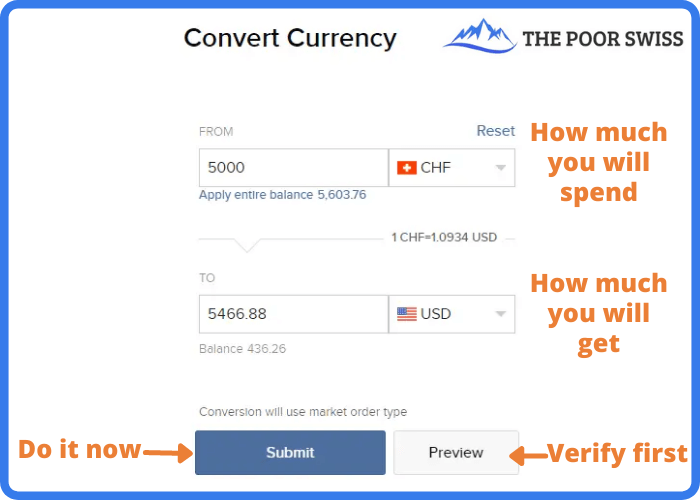
In this view, you can choose which currency you want to convert and into which currency. Next, enter the amount you want to convert and click Submit. Interactive Brokers will then generate an order for you on the forex market. And once this order is executed (generally instantly), you will get your USD.
If you want more control, there is another way to convert currency. You can buy currency like you buy shares (see next section). For instance, you can purchase shares in USD.CHF, which means buying some USD with some CHF. If you want to buy USD with EUR, you can look for USD.EUR. If you want to buy EUR with USD, you can trade for EUR.USD. You get the idea!
This method will give you more options. But in most cases, the simple conversion will work nicely. I only use the default currency conversion method since it is simpler and saves time.
Buy an ETF on Interactive Brokers
Once you have enough cash in the correct currency, you can buy some VOO ETF shares (or any other ETF). You can use the search function from the top right of the interface.
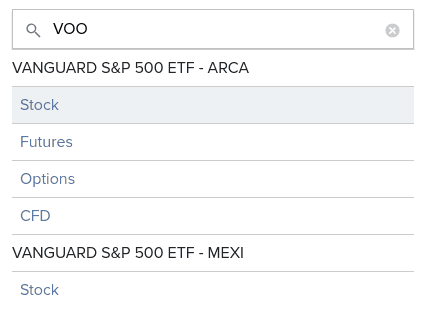
You can type VOO or the name of any other ETF you wish to buy shares from and type Enter. Interactive Brokers will propose several options (Stock, Futures, Options, and Contracts For Difference (CFD)). ETFs are listed as Stock. And sometimes, you will also see several exchanges. Here, we want the Stock on the ARCA exchange.
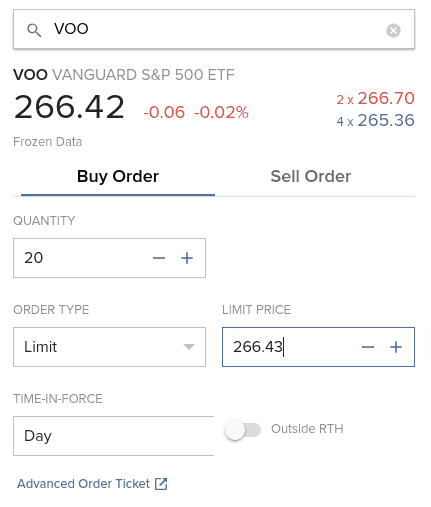
If all these values confuse you, do not worry! Here is what they mean:
- 266.42 is the current market price.
- -0.06 is the last change of the market price in absolute value.
- -0.02% is the last change of the market price in percent.
- In red, you will find the ask volume and the ask price (266.70)
- In blue, you will find the bid volume and the bid price (265.36)
And the fact that it is written Frozen Data is because I did not pay to get real-time data for this particular market. Or it could also mean that I am trading out of hours. If you are a passive investor like me, you only need to worry about the current price. You can ignore all the other information.
Then, you can set the amount you want and the Limit price. Since it is a trade, you can use several order types: Market, Limit, Stop, and Stop Limit. If you are trading with a popular ETF, you can use a Market order.
The execution on IB is good enough that you will not have issues with market orders. Otherwise, you can use Limit Orders. You can set the Limit price based on the current data. But be careful about not trying to optimize too much.
I only use Market Orders. They are simple and not nearly as inefficient as some people think.
You can also set the duration of the order. Either the order is valid only today or Good Till Cancel (GTC). If you want to learn more about these options, I wrote an entire article about stock market order types.
I would advise using the Preview option to ensure you want this operation.
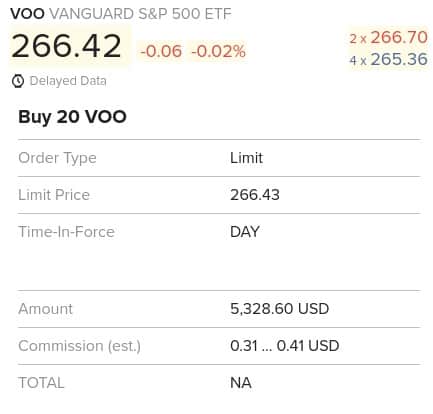
This view will give you all the information you want about the order. You need to pay special attention to the amount and the commission.
For instance, I would have paid 5328.60 USD for the purchase of 20 shares, and I would have only paid fees between 0.31 and 0.41 USD (yes, IB is that cheap!). Once satisfied with your order, click Submit to validate it and wait for it to be executed.
If you use a market order and the stock exchange is open, IB will instantly execute. IB will execute a limit order based on the price you set. If you set a price higher than the current price, it will also be executed instantly.
Congratulations, you now have shares of your ETF! You can follow this simple every month and be on your way to using the stock market for great returns!
Warnings from Interactive Brokers
When you trade with IB from the Account Management interface, you may encounter several warning popups on your screen. You will get used to it. But when you are starting to invest, it can be overwhelming. So, here is what the biggest warnings mean.
And do not forget to click the check box to avoid seeing them again!
Warning about not enough cash settled
Occasionally, you will get a warning saying you do not have enough settled cash on your account.
If this happens, you likely have to wait until your cash is settled. In the US, it takes a few days for cash to be available. If you have a margin account, you can directly use your deposit, but if you have cash account like most people, you will have to wait until settlement.
If you want to learn more, I have an article about cash settlement on IB.
Warning about small currency transactions
The first warning is when you do a small currency transaction below 25’000 CHF.
In that case, IB will tell you that the order is too small to use IDEALPRO and FXCONV instead. You do not need to worry about that! They are just two different routing systems.
For orders below 25’000 CHF, IB will not guarantee interbank exchange rates. So, you may be getting a slightly worse deal. But the difference is negligible enough that you do not have to worry about it. I have converted many times small amounts with IB without any issues.
Warning about lack of real-time data
The second warning that could pop up is when you buy an ETF without real-time data.
If you are like me, you will not have paid the monthly fee to get real-time prices. Passive investors do not need real-time pricing! The prices you see in the interface are delayed by 15 minutes. If you need real-time data, you can always look at Google Finance to see them.
So once again, do not worry about this warning.
Warning about price caps
The third warning is about mandatory price caps. This warning is probably the least obvious of the three.
In 2016, Interactive Brokers started implementing price caps for market orders. It means that a limit order with a price significantly different from the market price cannot be executed even though it would be valid otherwise. IB uses its way of setting price caps to decide what is fair and what is not.
For instance, if a stock trades at a market price of 100 USD and you open a buy limit order at 50 USD, IB will not take this limit order into account to execute against other market orders.
Thus, using price caps on market orders is simply a protection for investors using market orders. This protection is good for honest investors like you and me.
Once again, you can safely ignore this warning.
FAQ
How much does it cost to convert currency on IB?
Converting currency manually will cost 0.002% of the conversion, with a minimum of 2 USD. Unless you are converting very high amounts, you can assume that you will pay 2 USD per conversion. For medium to considerable amounts, this is very cheap. But you should avoid converting tiny amounts.
Are the fees the same for each IB interface?
Yes. There are multiple ways to trade with IB, but the fees are the same on each of them.
Conclusion
The broker you need to buy stocks and ETFs reliably and at extremely affordable prices. Trade U.S. stocks for as little as 0.5 USD!
- Extremely affordable
- Wide range of investing instruments
Now, you are already done! You will now have more shares of the VOO ETF (or any other ETF you want to buy). The entire process is the same for any other ETF. You have to change the name you are searching for, and if it is available in Interactive Brokers, you can buy it.
It is straightforward to trade from the Account Management interface. You can do all the basic investing tasks from this interface. Likely, most simple investors will never need any other interface.
As you can see, you can do much from the Account Management interface. Even though its name talks only about managing your account, it can do much more than that! You can do most things on this interface.
Of course, there are a few limitations. For instance, some Interactive Brokers order types are not available. But that is not an issue for simple passive investors. The account management interface is the only one I use, and I never found anything missing. I invest every month using this interface.
For beginners with Interactive Brokers, I recommend using the Account Management interface. Once you are more familiar with it, and if you are interested, you can start exploring the other interfaces. But you can go your whole investing life only using this single interface.
To streamline your investing, you may consider automating your investments with Interactive Brokers. With that technique, you will have almost nothing to do to invest each month.
If you prefer trading from your mobile, you can buy ETFs from the IBKR Mobile Application. Or, if you need additional information on this broker, read my review of Interactive Brokers.
Do you have any questions on how to use IB? Do you have any tips for the Account Management interface?
More reading

Swissquote vs Interactive Brokers 2026
Swissquote and Interactive Brokers are great brokers for Swiss investors: which should you choose? We compare Swissquote vs Interactive Brokers in detail!
Step-by-Step Guide: How to buy an ETF with Saxo in 2026
Trade on Saxo. A step-by-step tutorial on how to buy your first ETF with Saxo Bank, covering currency conversion, order types, and fees.
How to Open an Interactive Brokers Account in 2026?
Start trading with IBKR. Follow our step-by-step guide to opening an Interactive Brokers account and access global markets with low fees.
Learn easy ways to optimize your finances and save thousands in Switzerland with our exclusive e-book. Learn about the most cost-effective financial services tailored for savvy residents and expats!
Get Your FREE Swiss Money-Saving Guide
Hello Baptiste,
Thank you for answering my questions.
Now everything is clear with the “split spread”, I will add that I do not use and do not want to use GRP.
As I mentioned, I only invest in ETF Acc. and companies that do not pay dividends but buy back their shares, such as Berkshire, I think there are gems on the market.
Then, if I do not have large capital and to deduct min. 100chf doesn’t make sense.
It is this unpaid dividend capital that snowballs for me.
He invests regularly, but buys only on corrections and not on a set date in the bank and by transfer.
If someone doesn’t get offended, and if it’s possible on this blog, of course, I’ll give you a few ETFs.
– Tiker:JREG, it’s great and ESG, it will probably beat World or has already beaten it.
– Tiker: SP5A or LYP7, ter. 0.03%, 0.05% are etf Acc. and I really don’t need anything else.
This one, for example (Tiker: JREU), beat ishares SP500 (Tiker: CSSPX) in a 5-year period by 7%, I know that Ter is bigger, but I don’t have to think about the dividend and it fully compensates all the costs and, in addition, it is ESG, which will be there sooner or later more and more.
In addition, I am not always dependent on USD. It operates similarly to Warren’s company, selecting companies.
Thank you for writing.
Regards
Andrea
Hi Battista,
Thanks for your kind reply.
I still have questions:
1. I opened an IB UK account as you suggested, but what changes with the IB US account?
2. Can I switch from UK to US account with my current account? or do I have to open a new account from scratch?
3. you suggested in the opening to impose fixed prices. However, if I change to variable prices, will it help me to declare my income or is it better to stay with fixed prices?
4. Example _ I want to invest only in accumulative ETFs, is it possible that these ETFs are not available on the US stock market? I searched and I see that there are but only with IR and LU domicile, why? So it costs me more to buy European ETF acc.
5. Do you have a solution to buy ETFs in USA acc? Or do you have a site where you look for these ETFs acc. ?
Thank you very much for your kind reply.
Could you do a FREEDOM 24 broker review?
I really hope I’m not asking too much of you but these are very useful things for others too.
Best regards
Andrew
Hi,
1) There are few things that change in terms of permissions and legal entity, but not much.
2) No, entirely different. Maybe the support can transfer an account, but you cannot do it yourself.
3) There is no change to declare anything, it only changes the prices of transactions.,
4) US ETFs have no accumulative versions, that’s correct. If you want US ETFs, you will need distributing ETFs.
5) My recommendation is to buy distributing ETFs.
I will consider a Freedom 24 review, but that’s not on the top of my list.
Hello Baptiste !
Thank you very much for answering my questions. I’m sorry that I wrote the same questions twice.
I know that you propose ETFs that pay a dividend, but I believe that this is only good for people who have larger capital, but if someone invests for the long term and with smaller amounts, my calculations show that accumulating ETFs are much better, even though TER is more expensive.
I have one more question: how can I change the settings and use “split spread” prices?
A really great website and very helpful.
Regards
Andrea
Could you share your computations? I fail to see how an accumulating ETF could be better despite a higher TER, unless you are not investing regularly.
Split spread can be done easily through algorithms from the desktop interface (TWS). But it cannot be done on the web interface directly. You can use a limit order very carefully set but you have no guarantee it will be where you want given market fluctuations.
But this is a very advanced topic. If you are doing only a few transactions a month, this will not make any difference.
Hi Battista,
congratulations for, great work you do for everyone, I’m happy for your blog and I always follow you.
Can you help me, because I have a problem with IB:
– I recently opened the account and followed your opening instructions, but unfortunately I can’t buy ETFs like BTC, ETH on the IB.
I can’t even buy ETFs (BTC.ETH) and ETNs (Bitcoin and ETH) in Europe.
Please can you show me the right path or explain what I did wrong.
Thank you very much for your kind reply.
Best regards
Andrew
Hi Andrea
THanks for your kind words.
Unfortunately, I don’t think we can trade crypto on IB as Swiss citizens, or at least not by default.
You can try requesting crypto permissions on your account (Account Settings -> Trading Permissions) but if that does not work, I have heard that you need IBKR US for that. But since I don’t trade crypto, I don’t really know.
Ciao Baptiste,
complimenti per tuo ottimo lavoro che fai, veramente sono felice e ti seguo sempre.
Ti scrivo, perché ho un problema con IB:
– da poco ho aperto il conto e ho seguito il apertura da tue indicazioni, ma purtroppo ho un problema per acquistare ETF sul BTC, ETH sul IB.
Devo dire che ho provato di tutto ma non ho permesso acquistare ETF(BTC.ETH) , ETN (Bitcoin e ETH) anche in Europa ( quello che ho saputo clienti IB possono acquistare BTC e ETH in EU senza problemi).
Per favore mi puoi indicare la strada giusta oppure spiegare cosa ho fato male.
Grazie mille per la tua gentile risposta.
Cordiali Saluti
Andrea
Hi Andrea
Sorry, but I will not answer questions in Italian, please ask in English (or in the French or German translation).
Hi Battista,
congratulations for, great work you do for everyone, I’m happy for your blog and I always follow you.
Can you help me, because I have a problem with IB:
– I recently opened the account and followed your opening instructions, but unfortunately I can’t buy ETFs like BTC, ETH on the IB.
I can’t even buy ETFs (BTC.ETH) and ETNs (Bitcoin and ETH) in Europe.
Please can you show me the right path or explain what I did wrong.
Thank you very much for your kind reply.
Best regards
Andrew
Hi andrea
Thanks for your kind words.
Unfortunately, cryptocurrencies require extra permissions. We cannot trade them either from Switzerland with IB. You need to use the IBKR US account instead of the IBKR UK and even then I am not sure it works for every citizenship. I have never done it since I do not invest myself in cryptocurrencies.
Alo, I have in inquiry very time I tried to buy VOO or VYM, I am told I need a KID and I cannot access that stop and been forced to get VUAA instead, is there a possibility, I am currently as a Norwegian resident.
Any information is appreciated!
Hi S,
Norway is not part of the EU. However, it is part of the EEA so, it may be subject to the same rules and not have access to US ETFs. But I am definitely not an expert there.
Hi Baptiste,
I was following your tutorial and converting CHF to USD and had to pay a “commission of 1.79 CHF”. Is this normal? Is there a way to go around it?
Thanks,
Ana
Hi Ana
It’s normal. Each manual currency conversion costs 2 USD with IB. These days, it’s about 1.79 CHF indeed.
If you convert less than 6500 CHF and have a cash account, you can let IB do the conversion for you and it will be cheaper.
Hi Baptiste,
Two questions if I may:
1. Do you buy ETFs always in USD? Why?
2. If yes, are you not then incurring in potential currency risk in the future?
Hi Alex
1) Yes, I do. Because the best ETFs are in USD.
2) Yes, of course. But there is no good way around it for long-term investing.
you can’t buy VOO in IBKR unless you are US resident. As Swiss you definitely can not buy.
Please stop spreading misinformation, this is just wrong. You can buy US ETFs on IB, I have been doing that for years.
How? I set up the IB today, I try to buy VONG (the vanguard growth ETF) and I am rejected.
DO you have any particular type of account that allows you to do so?
Hi Alejandro
Normally, you should not need anything special to buy a US ETF, only permissions to trade on the US stock exchange.
Are you sure? Another commentor @Alejandro could not buy as I was not able to buy. I tried to purchase IBIT and rejected again. Why don’t you show screenshots for purchase of IBIT, if you wish.
Yes, I am sure.
However, IBIT is a special case because it’s crypto, and we are not allowed to buy crypto on IB directly. We can apparently request permissions, but I am not sure we can get it.
I can show a screenshot for VT, but not for IBIT.
Hi,
In another article you’ve recommended to use “Account type” as “cash”.
However, when placing orders to buy ETF, using “cash’ as account is not allowed, i.e. only “Margin” are accepted.
What do you recommend?
Thanks,
Hi Chris,
That’s not accurate. You can buy ETFs with a cash account. You do not need margin to buy ETFs. You only need to have the cash available and settled before you can buy.
What does IB say when you try to buy an ETF with your cash account?
Am I seeing this correctly, that IB actually calculates your gains with the all buying fees included in the buying price? So that the gain is more accurate than just comparing to the price the stock was at when buying? I am used to this latter version from the previous broker I used, so I always had to have a separate Excel where I was calculating in all the fees I paid to see what I actually made in gains.
Yes, all fees are normally included in the gains reported by IB.