
UBS Key4 Review – Pros & Cons
| Updated: |
(Disclosure: Some of the links below may be affiliate links)
UBS is not usually known for proposing services at an affordable price, but their Key4 is an exception to that rule. After the integration of Credit Suisse clients using the CSX products, UBS has made their Key4 product free. This makes it interesting, and I wanted to review this service to see its value.
In this article, I review UBS Key4 in depth: its features, its fees, its advantages, and its disadvantages. By the end of the article, you should know whether UBS Key4 is a good service for you.
| Monthly fee | 0 CHF |
|---|---|
| Users | N/A |
| Card | Mastercard Debit |
| Currencies | CHF |
| Withdrawals in Switzerland | Free at UBS ATM, 2 CHF otherwise |
| Withdrawals abroad | 5 CHF |
| Languages | German, French, Italian, and English |
| Custody bank | UBS |
| Depositor protection | 100’000 CHF |
| Customers | 3’000’000 |
| Established | 1862 |
| Headquarters | Zürich, Switzerland |
UBS Key4
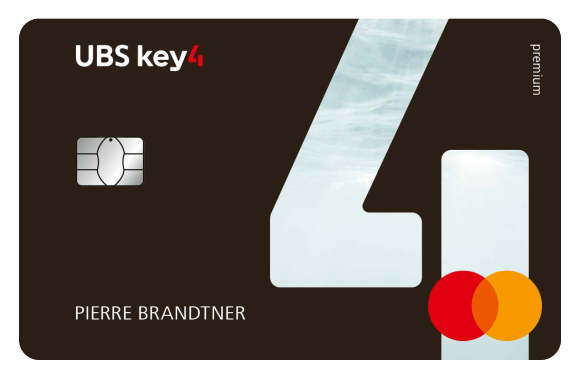
UBS Key4 is a banking package by UBS, the biggest bank in Switzerland (and among the largest banks in the world). The UBS bank itself has about three million customers in Switzerland (after the merger with Credit Suisse), including UBS Key4 customers.
This banking package is a mobile banking package; it is made for people that will use their phones to access the bank, not their offices. It also does not offer access to the e-banking system of UBS. So, it is very similar to the banking packages of digital neobanks.
This banking package contains multiple components:
- A private account
- A savings account
- A debit card
- A prepaid or credit card, depending on your plan.
There are a few conditions for this banking package.
- You must be a resident of Switzerland.
- You must be a citizen of an allowed country.
- Foreigners must have a B, C, Ci or L permit.
- You must be at least 12 years old.
These requirements are rather large. It is interesting to note that US citizens are allowed to open an account, but they must do so in person and not online, since there are extra regulations for US citizens. But it is good that US citizens resident in Switzerland can open accounts without fees.
As of July 2026, it is no longer possible to open new accounts. Already open accounts are still working, and no shut down date has been announced. This seems to be done as part of the Credit Suisse integration.
UBS Key4 Features
First, we should look at the features of the banking package, to make sure we have everything we need.
It is worth noting that UBS only has one mobile app. The same mobile app will serve standard UBS customers and UBS Key4 customers.
With the UBS Key4 app, you can do all your standard operations:
- Pay your QR bills
- Pay your e-bills
- Do wire transfers
- Check your balance and transactions
It is also good to note that UBS accounts and apps are available in English. This can be essential for expatriates.
You can also use TWINT with your UBS Key4 account through the UBS TWINT app. If you want to pay with mobile without TWINT, you can also use Google Pay and Apple Pay. So, you have all the options you need to pay with your phone.
Overall, there are more than enough features with this account. Users have also reported that we could access the UBS e-banking system. This can be a nice advantage.
Banking Fees
We also must look at fees, something UBS is usually not good at.
Interestingly, the base UBS Key4 account is free! There is no monthly or yearly fee. This account used to be paid, but it got free during the integration of Credit Suisse customers into UBS. In fact, users of the late CSX app were migrated to the UBS Key4 offer, which used to be pricier but went free to keep more customers.
With the free UBS Key4 account, you get a free private account, a free savings account, a free debit card, and a free prepaid card. This is a good deal.
Standard domestic payments in CHF are free. If you do a SEPA payment, you will pay 0.30 CHF per payment. And if you do a EUR payment in Switzerland, you will also pay 0.30 CHF per payment.
With the debit card, you can withdraw for free at any UBS ATM. But you will pay 2 CHF for each withdrawal at other ATMs. If you withdraw abroad, you will pay 5 CHF per withdrawal and a markup of about 2.00% on the UBS exchange rate. If you use the debit card abroad or in a foreign currency, you will pay a 2% surcharge on top of the UBS exchange rate.
Currently, you do not get any interest rate on the account.
Additionally, there are two more packages available:
- Pro at 14 CHF per month
- With a standard credit card instead of the prepaid card.
- With travel insurance.
- With only a 0.50% exchange rate surcharge on the debit and credit cards.
- Prime at 22 CHF per month
- With a premium credit card instead of the prepaid card.
- With travel insurance and collision damage waiver for rental cars.
- With priority pass to travel loungers.
- With only a 0.50% exchange rate surcharge on the debit and credit cards.
I do not really see the value of these premium packages. At 14 CHF per month minimum, they are too expensive to be valuable, in my opinion. The low exchange rate is good, but you can get this for much lower than 14 CHF.
So, the base banking package is actually at an excellent price. You will get access to a massive bank for a fair price. On the other hand, the premium packages are overpriced for the value they provide.
User Reviews
We should look at what other users think of UBS Key4.
Unfortunately, I could not find user reviews of Key4 directly. So, we should look at UBS reviews in general.
We can start by looking at UBS Switzerland on Trustpilot. Unfortunately, there are few of them. As I write this article, there are 135 reviews, with an average score of 2.4 out of 5. When we look at the negative reviews, we see the usual complaints about the customer service and some compliance. These are the same complaints I see in many of my reviews. On the positive side, customers are happy about the service in general, and we can see that there are multiple reviews by people being with the bank for more than 10 years. However, it is impossible to draw conclusions from 135 reviews for a bank with millions of customers.
As another source of reviews, we can use the reviews of the app itself. On the Play Store, the UBS & UBS Key4 app (the name of the app) got 4.7 stars out of 5, out of almost 65’000 reviews. The many positive reviews are very positive about the app itself, how it works, and the features it has. The negative reviews are mostly about some technical difficulties. The reviews are quite similar on the App Store, where the app also gets 4.7 stars and has more than 150’000 reviews.
Overall, users of UBS seem pleased about the app. It is true that many people try to leave UBS to save on fees. But the majority of UBS users either do not know they can pay less or are ready to pay for what they feel is a premium bank.
Security
We also need to look at the security of using UBS Key4 as a bank account.
The security of UBS Key4 is the same as UBS itself. The assets are held in the same way and are protected by the Swiss deposit insurance. So, in case of bankruptcy, your assets should be protected for up to 100’000 CHF if the bank does not have enough assets to liquidate to cover the deposits.
However, there is a limitation there. The deposit insurance has about six billion CHF in funds. So, when we are talking about a bank with about 3 million users, including UBS Key4 customers, this would come up to an average protection of about 2000 CHF per person. Of course, some people have more money than others, so this may vary. But in case of failure, the deposit insurance is unlikely to cover every customer.
Recent events have shown that the Swiss government is unlikely to let such a systemically important bank fail. In 2008, UBS had to be bailed out with 60 billion CHF. And in 2023, the Swiss government organized the takeover of failing Credit Suisse into UBS with billions in guarantees.
Technically, I could not find anything wrong with UBS or UBS Key4 security. You can use multiple factors of authentication when accessing the apps. And they are sharing helpful information on cybersecurity on their website.
So, overall, I think that money deposited at UBS is safe. They do not have the best history, but they have been around for 150 years and I do not think they are going anywhere.
Alternatives
It is essential to compare a product with its alternatives.
UBS Key4 vs Bank WIR Bankpaket top

Bank WIR Bankpaket top is an excellent banking package without fees from a reputable bank.
Use our link to receive 50 CHF when you open an account.
- Interbank exchange rate
We are currently Bank WIR Bankpaket top, a package by another traditional bank, WIR Bank. So, we should compare UBS Key4 and Bank WIR Bankpaket top.
Both are traditional banks. Therefore, you can do most operations in UBS and Bank WIR offices. There are much fewer Bank WIR offices than UBS.
The set of features is quite similar. With UBS Key4, you will get a prepaid and debit card, while you only get a debit card with Bank WIR Bankpaket top. In both cases, you can use it in Switzerland and abroad. In both cases, you can use your account with TWINT, Google Pay, and Apple Pay.
If we look at the fees, the two accounts are also very similar. They both have no monthly fees. And you can withdraw for free at UBS ATMs with UBS Key4 and in 24 times worlwide with Bank WIR Bankpaket top. Everywhere else will cost 2 CHF per withdrawal.
Bank WIR Bankpaket top has a major advantage in that its debit card can be used abroad and in foreign currencies without an exchange rate surcharge. It would be very expensive to use the Key 4 card for that.
The Bank WIR Bankpaket top package is better than UBS Key4 because of its usage abroad.
UBS Key4 vs Neon

All the services you need to pay, save and invest, in a neat package, with extremely good prices!
Use code poorswiss to get your debit card for free!
- Invest with great fees
For years, Neon has been our primary bank. Neon is a fully digital bank account, so it is a suitable candidate to compare against UBS Key4. Neon is fully digital, while you can also use UBS Key4 online and in offices.
You get a few more features with UBS Key4 than with Neon. You will get two cards and access to a real TWINT app.
Both accounts are free for the base account, and both accounts have premium offers. One advantage of UBS is that you can get many withdrawals for free (at UBS ATMs) while each withdrawal is 2 CHF with Neon. On the other hand, Neon has a strong advantage for paying abroad, with only a 0.35% surcharge on top of the MasterCard exchange rate. With UBS, you would need to pay 14 CHF a month to get a 0.50% surcharge.
If you need to pay abroad, Neon will be better than UBS Key4. In Switzerland, both accounts will be extremely similar.
UBS Key4 FAQ
Who is UBS Key4 good for?
UBS Key4 is good for people who want an affordable digital bank account from a massive bank.
Who is UBS Key4 not good for?
UBS Key4 is not great for paying abroad. You would need to either a large exchange rate surcharge or pay a large monthly fee.
%seo_title% Summary
UBS Key4 is a digital bank account by UBS that recently became free. Is it any good? We find out in this in-depth review.
4
UBS Key4 Review - Pros & Cons - The Poor Swiss Pros
Let's summarize the main advantages of UBS Key4 Review - Pros & Cons - The Poor Swiss:
- No monthly fee
- Access to a good app
- Access to UBS at a fair price
- Good set of features for the price
- Support of English
UBS Key4 Review - Pros & Cons - The Poor Swiss Cons
Let's summarize the main disadvantages of UBS Key4 Review - Pros & Cons - The Poor Swiss:
- Not great to use abroad
- Premium accounts are very expensive
Conclusion
Overall, the UBS Key4 account is a good account. If you want access to UBS at an affordable price, this is the account for you. However, there is nothing special about it. It is free and has good features. However, it is also comparable to the accounts of many traditional banks. And it is still inferior to many digital bank accounts.
So, if you absolutely want access to UBS, UBS Key4 is great. Otherwise, the account does not stand out.
If you are interested in other traditional accounts, the account from the Zürcher Kantonalbank is quite interesting. Or, if you want to get some better exchange rates abroad, you can take a look at our neon Review.
What about you? What do you think about UBS Key4?
More reading

Alternative Bank Switzerland Review 2026: Pros & Cons
Banking with values. Read our review of the Alternative Bank Switzerland (ABS). We analyze their social mission, fees, and if they are right for you.
Yapeal Review 2026 – Pros & Cons
Is Yapeal worth it? Read our 2026 review of the Yapeal digital bank account. We analyze their fees and features to see if it competes with Neon.
Raiffeisen Bank Review 2026 – Pros & Cons
Is Raiffeisen good? Read our review of Raiffeisen Bank. We analyze their member benefits and fees to see if this cooperative bank fits your needs.
Learn easy ways to optimize your finances and save thousands in Switzerland with our exclusive e-book. Learn about the most cost-effective financial services tailored for savvy residents and expats!
Get Your FREE Swiss Money-Saving Guide
Hi Baptiste,
It seems that UBS key4 is no longer available for new customers? At least that’s what I understand from the “Services and prices” document from 24 June 2026.
Best regards,
Matt
Hi matt
The rest of the website seems to indicate that onboarding is still possible. Can you point me to the document? I will check it out.
Hi.
ubs.com/accounts-prices
At page 26, under ‘UBS key4 banking’, it mentions that “UBS key4 banking is no longer available to new clients”.
Thanks! That’s very interesting indeed. I will mention it in the article, but I am surprised that UBS did not more clearly communicate this.
Hi,
It seems key4 accounts aren’t available for new clients (page 26) however new packages have introduced (Easy, Classic, Gold, Platinum) and domestic CHF transactions aren’t free (CHF 0.30 instead, page 15) anymore (except if total assets never fell below CHF 10,000 at any point in the previous month or if you have a UBS Building Financing or a UBS Mortgage).
Services and prices
https://www.ubs.com/ch/en/services/accounts-and-cards/accounts/private-account/_jcr_content/root/contentarea/mainpar/toplevelgrid_8238102/col_1/inner_copy_copy/col_1/teaser/linklist/link_copy.418484773.file/PS9jb250ZW50L2RhbS9hc3NldHMvcmMvc2VydmljZXMvYWNjb3VudHMtYW5kLWNhcmRzL3N0YXRpYy9mYWN0LXNoZWV0cy9zZXJ2aWNlcy1wcmljZXMtZW4ucGRm/services-prices-en.pdf?intCampID=download-services-and-prices
Hi Roy.
Indeed, they have been closed for onboarding since July 2026, as mentioned in the article.
On the other hand, that’s not how I read page 15. I read the list as any of these conditions, not all of these conditions:
So for me, I still read free payments in CHF for UBS Key4.