
E-tax statements now available for Interactive Brokers
| Updated: |
(Disclosure: Some of the links below may be affiliate links)
In Switzerland, e-tax statements allow us to fill out our taxes faster by embedding all data in a digital format for import into our tax software. Many Swiss banks and brokers offer this service.
Until now, it was not possible to do that with Interactive Brokers. Fortunately, datalevel, a Swiss company, now provides this service and generates e-tax statements for Interactive Brokers accounts.
In this article, we will detail this service, how it works, and how much it costs. By the end of the article, you should know whether you want to generate an e-tax statement for your Interactive Brokers account.
e-tax statements
E-tax statements, or electronic tax statements, are an electronic version of a standard tax statement. You can enter it into your tax software, and all the important data will be filled out automatically.
An e-tax statement is a PDF with a barcode. This barcode can be scanned by the tax application to extract all the data. They exist for banks, robo-advisors, and broker accounts.
The main advantage of an e-tax statement is that it transfers all the data to your tax return. You will save time, and you will avoid making any mistakes. For most people, saving time is the biggest advantage of these statements.
Some brokers, like Saxo, offer e-tax statements for free. While others, like Swissquote, offer it for a fee.
e-tax statements for Interactive Brokers

The broker you need to buy stocks and ETFs reliably and at extremely affordable prices. Trade U.S. stocks for as little as 0.5 USD!
- Extremely affordable
- Wide range of investing instruments
Until now, it was not possible to generate e-tax statements from Interactive Brokers. Since Interactive Brokers supports many countries, it does not generate tax statements for all of these countries.
Thanks to datalevel, this is about to change! In 2025, datalevel announced they will be able to generate e-tax statements for Swiss Interactive Brokers accounts. datalevel AG is a Swiss company specializing in data aggregation for financial companies. They were founded in 2017. Until now, they were only providing B2B solutions, but they are now delving into B2C with this new offer.
This system works by linking your account to the account of datalevel, allowing them to gather data and generate the tax statements. They can only gather data; they cannot modify anything or do any trade on your behalf.
These e-tax statements will cost 50 CHF. But if you link your account before December 31st, 2025, you will get a preferential price of 30 CHF for your 2025 statement.
Once the link is done, datalevel will be able to generate the statements on the first quarter of each year. They will then send you an invoice for the statement. And once you have paid the invoice, they will deliver the statement to you. This is a fairly straightforward process.
For more information, you can check out the offer from datalevel. They have an onboarding guide and an example e-tax statement. And if you want to onboard, you can also follow our guide in the next section.
How to link your account on Interactive Brokers
If you would like to link your account to datalevel, you can follow this simple process.
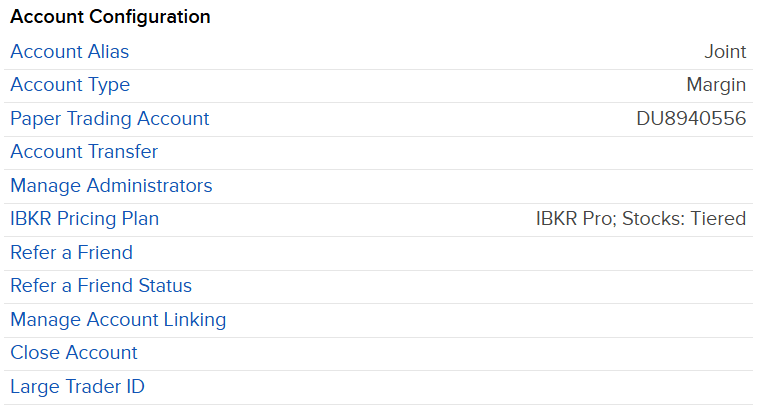
You need to log in to your account and go into the settings. From there, under the account configuration category, you will find the Manage Administrators option.

On this page, you will find the list of administrators of your account. And you can start adding a new one by clicking the plus button. If you are worried about the name administrator, I understand. This name is misleading because they do not have rights to change anything, only to get statements and reports. Administrator here does not mean they have all permissions, like it is on your computer.
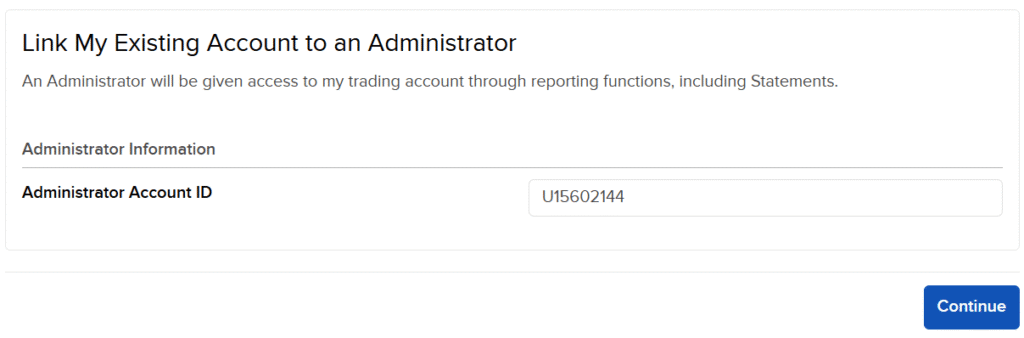
On the next screen, you will need to enter the account information of datalevel, which is U15602144. This is the Interactive Brokers account they use to link together with yours. Once you click Continue, the link will be established. datalevel will then confirm the connection, and you will be good to go. If you go back to the Administrators page, you should see it.

If you want more details to be sure it is correct, you can click on the information button on the left of the name of the company.
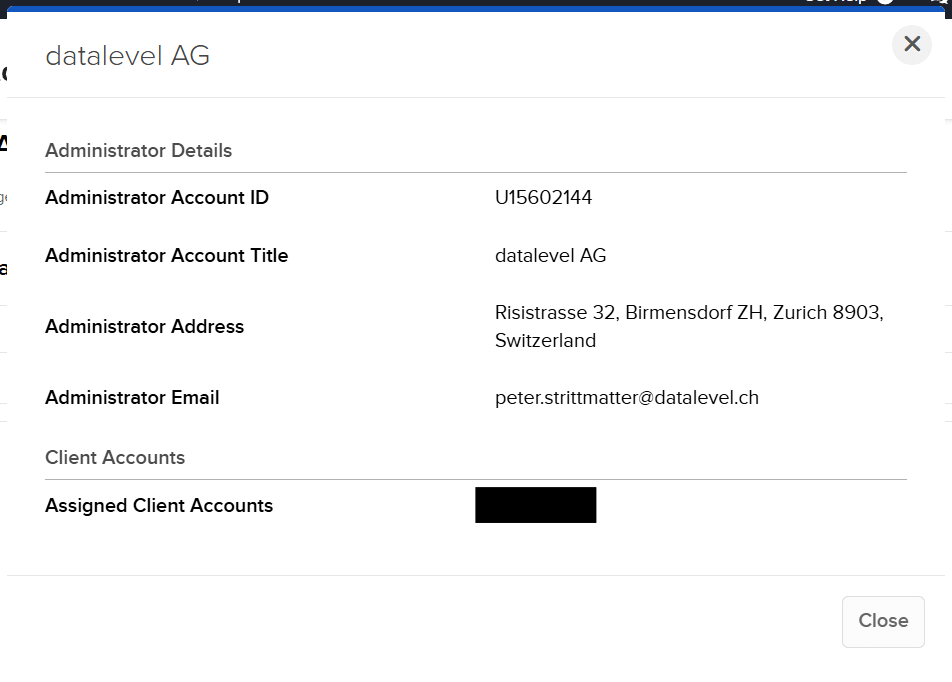
Here you will see all the details of the account. Peter Strittmatter is the CFO and member of the board of datalevel AG and one of the two founders.
At this point, you have done everything already. All you need to do is wait for the e-tax statement to be generated and sent to you.
Pay and download your e-tax statement
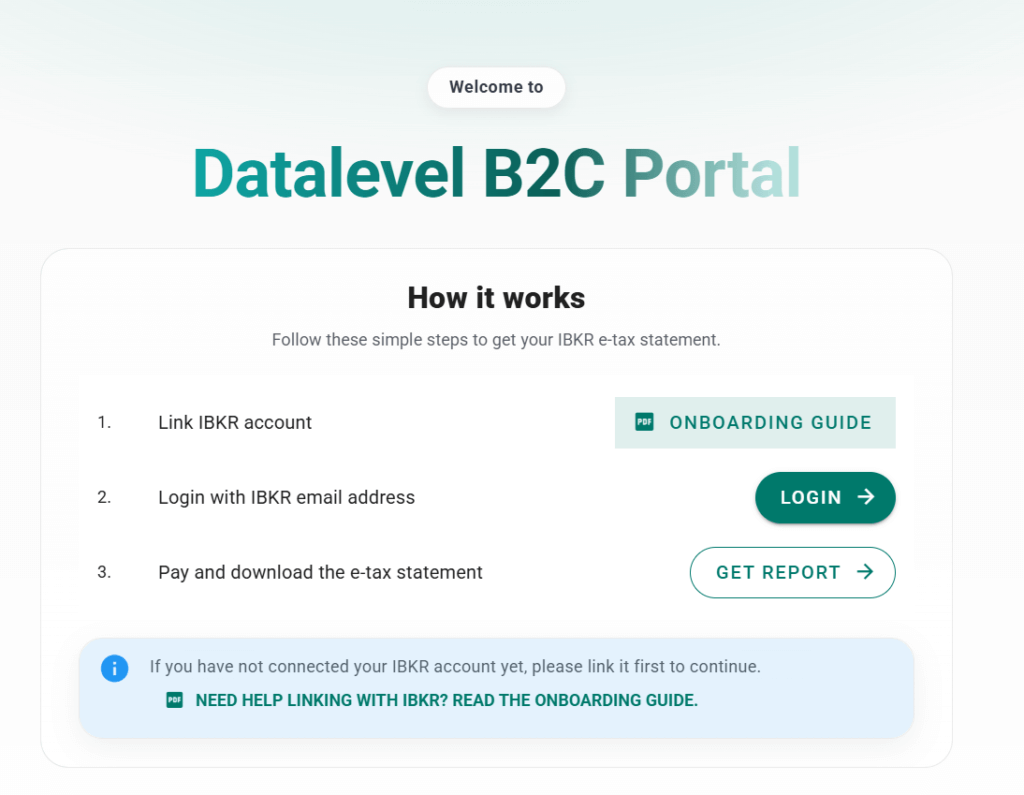
Once the e-tax statement is ready, you should receive an email from Datalevel. In the email, you will get a link to the IBKR Datalevel Portal. You can click on Login, and this will ask you for your email (the same one you are using for IBKR). This will then email you a link to fully log in.
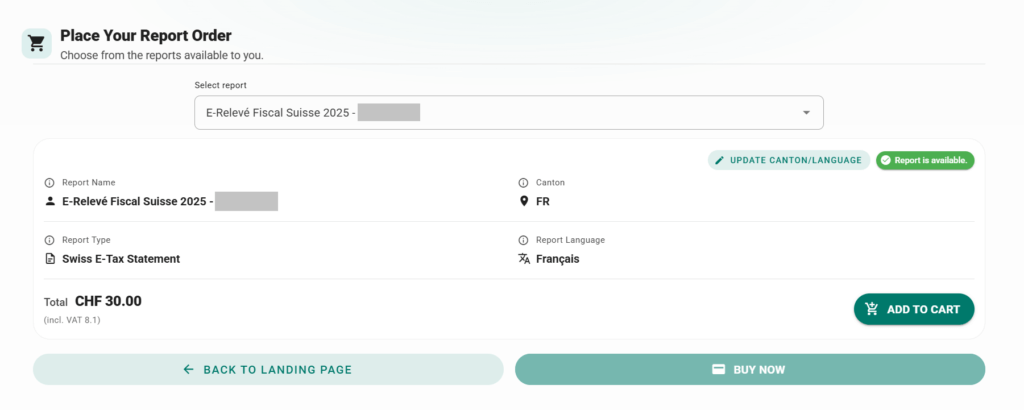
Once you are connected, you will see all your e-tax statements. If you have multiple accounts connected, you will see multiple, but most people, like me, will only see one. You can update the language of the statement and the canton of the statement. Currently, it may take a day to update, but in the future, it will be instant.
For each statement, you can press the add to cart button. Once you are satisfied, you can press the buy now button to finalize your order and pay.
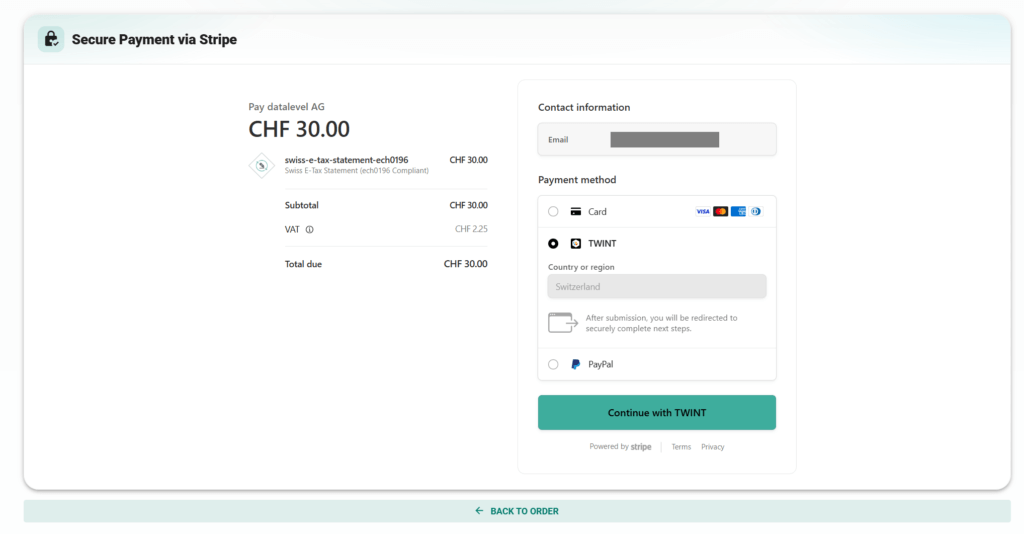
You have multiple options for paying your e-tax statements:
- Pay with a credit card
- Pay with TWINT
- Pay with PayPal
Once you have paid, you will get a confirmation and a link to the purchases page.
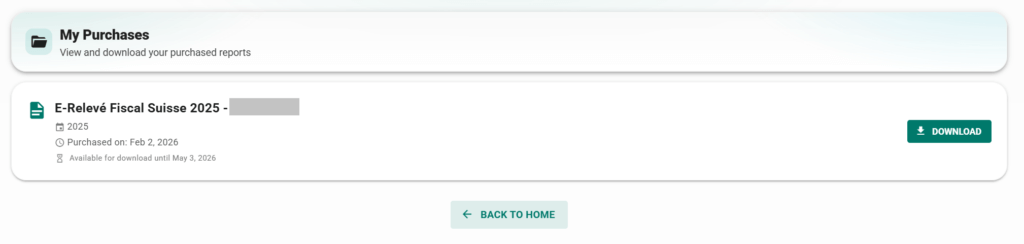
At this point, you have your e-tax statement. You can import it into your tax software and save time by not having to worry about filling everything by hand.
The entire process is quite smooth and only takes a few minutes.
Frequently asked questions
Can I use this e-tax statement with any Swiss tax software?
Yes. E-tax statements are a well-defined standard in Switzerland. Any tax software that supports e-tax statements will support the e-tax statement from datalevel.
Is it safe to link my IBKR account to datalevel?
Yes. The link to IBKR only gives datalevel access to reporting. They can get information, but they cannot change anything or trade.
How much does the e-tax statement cost?
The e-tax statement from datalevel for IBKR costs 50 CHF. If you onboard before December 31st, you only pay 30 CHF per statement.
What to do if you do cannot add administrators to your account?
If you have created your account through a special referral link, you will not be able to add administrators to your account. You can contact the IBKR support and ask them to unlink your account. After that, you will be able to follow the procedure and link datalevel to your account.
Conclusion
I am happy that datalevel is stepping in to provide e-tax statements for Interactive Brokers accounts. For many, the lack of these statements was a big disadvantage of IB.
I also think that the price of 50 CHF (30 CHF if you are early) is quite reasonable. This is cheaper than some Swiss brokers are charging.
In 2026, I am using this service to get an e-tax statement for our Interactive Brokers account. What about you? What do you think about this service?
To learn more, check out the information from datalevel.
If you would like to know more about Swiss taxes, you can read our Swiss taxes guide for securities.
More reading

DEGIRO vs Interactive Brokers for European Portfolio: Who is cheaper in 2026?
In-depth analysis of who is cheapest: DEGIRO vs Interactive Brokers. We are considering European investment portfolios for Swiss and European investors.
Zak Invest Review 2026 – Pros & Cons
Zak Invest is a new service by Bank Cler. Is this broker worth it? I analyze its features and fees and compare it with alternatives like Saxo and Neon.
Saxo vs Swissquote 2026 – Which is the best Swiss broker?
The big broker battle. Saxo vs Swissquote: We compare the two leaders in Switzerland to see which one offers the best fees, safety, and features.
Learn easy ways to optimize your finances and save thousands in Switzerland with our exclusive e-book. Learn about the most cost-effective financial services tailored for savvy residents and expats!
Get Your FREE Swiss Money-Saving Guide
Dear Baptiste,
Great article! I pas doing this manually and I pas lucky so far the tax always accepted what I sent them (canton Bern). Now I tried to follow your procedure, but can’t find “Manage Administrators option” under Settings, Account information, I have only Manage Account Linking, then I choose “Link my Existing Account to an Advisor/Broker ” but then I need to fill in this: “Link my Existing Account to an Advisor/Broker” which I don’t know what it is (I have tried “datalevel AG”, but it doesn’t work.
Anybody found a solution?
Thank you :)
Sébastien
Hi Sébastien
That’s weird, it should not be an advisor link, this is a different thing. Have you looked at the PDF from datalevel to make sure you are looking at the proper screen?
Dear Baptiste,
I contacted datalevel and they told me that I’m not the only one having this issue. Then I contacted IBKR support, here is their answer:
Initial Description: Cannot find Manage Administrator
Response from IBCS at 04-Dec-2025
Our system reflects you have opened your account via referral link. Kindly note referred accounts cannot link their account to administrators.
IBKR Client Services
*****
So no solution except to create a new account I guess. I will try again to contact them to find a solution as I guess many people have this problem.
Sébastien
Thanks for sharing, Sébastien.
It’s possible that you have a reseller account. Do you remember where you created from?
I have no idea whether you can convert to a direct account.
Hey, maybe this will be useful.
I experienced the same problem. After registering through a referral link, I didn’t have access to Manage Administrators. I wrote to IBKR support and asked them to remove the referral from my account. They did it, and after that the issue was resolved – I can see Manage Administrators now.
Thanks for sharing, Andrew! This is very useful. I will mention this in the article.
Dear Baptiste,
Finally I could solved the issue! Thanks a million to Andrew who provided the solution :)
Happy new year.
Sébastien
Glad you could solve it!
I‘m not paying 50 CHF for something I can do in an hour myself.
Totally fine indeed!
… and were you happy with the report you got while testing the service? Which leads to the question: would you recommend it? I only got VT (and my SO only has VT and IBKR ETFs)…
The online Zurich tax declation didn’t allow me to upload more than 10 pages I believe this year. With the sample report datalevel, I see that only the barcodes are already 9 pages. What should be submitted? Only the barcodes?
Hi Jonas, you upload the whole pdf. There is no 10 page limit where you upload eSteuerauszug in ZHprivateTax. I upload every year tax reports which have in total 11-17 pages.
Hi Baptiste.
I enjoy your articles and find them to be very helpful. I would like to ask you if there is a combination of Swiss E-tax software and/or LLM solution/agent that you would recommend? I see that there are several solutions out there. I also think a LLM given an annual statement from IBR could quite easily create an Swiss-compliant E-statement. Thanks!!
Hi Karl.
That’s a very good idea – we should also think about using LLMs to help us with this. Would you mind asking the same question on the Forum? This would make it easier to reply to (in thread-form) and for better interaction too.
Ypu do realize that LLMs don‘t „understand“ data they see, they just see patterns and guess what usually comes next with the same pattern? And that when you use them to analyze data they frequently „hallucinate“ data that‘s different than the source?
I do understand that an LLM alone doesn’t “understand” and may hallucinate, but modern AI systems do not rely on the LLM in isolation. They use additional layers—retrieval, validation, schema constraints, and reasoning safeguards to avoid hallucinations and preserve input data fidelity. So when used properly, they’re not just “guessing what comes next” but actually executing constrained transformations.
For the problem posed here, which is converting one structured document to another structured document, hallucinations can be mitigated to near (but not absolute) zero by:
1. Well-crafted prompts: They shape behaviour by constraining prediction using context and rules, thereby decreasing hallucinations and increasing accuracy.
2. Fine-tuned or specifically trained LLM-based systems: They are adept at document creation and submission acceptable to Swiss tax authorities.
2. LLM Challengers: A separate and different LLM is used to independently challenge and/or verify the output of the original LLM.
3. Deterministic calculator: Use a LLM to create and test deterministic programs in your favourite programming language. In this case, hallucinations are constrained to programming code and are quickly detected by compilers and AI-generated tests.
4. Assigning final human validation and responsibility, which is always needed for the submission of financial documents to tax authorities.
It would be nice to know if there is tax software and/or services moving in this direction.
Great Article. Thanks Baptiste.
Thanks, Andrea!
Hello,
can I also use this for my taxes for 2024, which I have to submit by the end of december?
Hi Thomas,
Somebody on the forum said he was able to get it for 2025 already and used it to file his taxes late indeed.
You can try contacting them to see if it’s possible as well in your case.
Hi 😊
I just started to use IBKR this year. I’m pretty much a noob and I wonder how I will need to do my taxes for 2025. I usually do it on paper so I’m not interested in the e-tax statement but I wonder if (how) I will get a document from IBKR that I can use in my tax statement. Please share your experience 😊
Hi Julien,
I have an article about that: How to file your taxes with Swiss and foreign securities in 2025
You will need to declare your transactions, the net worth at the end of the year, the amount of dividends and the dividend withholding.
And indeed, e-tax statements won’t help you much if you do it on paper.
Many thanks Baptiste for the post,
I am struggling every year to get the data for filling my tax return out of Interactive, and I have a pretty easy portfolio, just funds without any dividend.
I have not find any report layout that generates a straight forward format, do you , or anyone in the community have a good example or recommendation where to look? Many thanks in advance and congratulations for your good ckntr
I also generate an annual activity statement and it has all the information I need:
* value at 31.12
* list of all dividends withholding
* all transactions
Well… I could try it for Fr. 30.- for the next year’s tax filing. I hope you can opt out easily by just removing the linked administrator from your IBKR account, correct?
Hi MixMax
Normally, you should be good because they should ask you each whether you want to get your statement (and pay). So, opting out should be a matter of not asking.
But it’s a very fair point, we don’t want to end up with yet another subscription that is difficult to cancel.
It all depends. If it’s completely reliable and includes everything, including doing all the forms for getting back various foreign tax at source, then it could take a load off.
If I still have to double check these things myself though, then it wouldn’t be enough of a value proposition.
Same here. Looking forward to @Baptiste’s review mid 2026 (or whenever the final tax bill arrives). If it went smoothly, something to consider for 2026 tax report.
But overall my tax report from IBKR is so simple that it the e-tax statement process needs to be supersmooth to provide any benefit.
Hi Paul,
It should be accurate indeed; otherwise, it’s not interesting. I will try it this year, and I will report the status for sure.
I already got a report for my taxes for 2025 and trying it seems to yield the same results as when I did it manually, so I am quite confident.
You already got a report from datalevel AG for taxes of 2025?
During my testing of this service with them, yes.