
E-tax statements now available for Interactive Brokers
| Updated: |
(Disclosure: Some of the links below may be affiliate links)
In Switzerland, e-tax statements allow us to fill out our taxes faster by embedding all data in a digital format for import into our tax software. Many Swiss banks and brokers offer this service.
Until now, it was not possible to do that with Interactive Brokers. Fortunately, datalevel, a Swiss company, now provides this service and generates e-tax statements for Interactive Brokers accounts.
In this article, we will detail this service, how it works, and how much it costs. By the end of the article, you should know whether you want to generate an e-tax statement for your Interactive Brokers account.
e-tax statements
E-tax statements, or electronic tax statements, are an electronic version of a standard tax statement. You can enter it into your tax software, and all the important data will be filled out automatically.
An e-tax statement is a PDF with a barcode. This barcode can be scanned by the tax application to extract all the data. They exist for banks, robo-advisors, and broker accounts.
The main advantage of an e-tax statement is that it transfers all the data to your tax return. You will save time, and you will avoid making any mistakes. For most people, saving time is the biggest advantage of these statements.
Some brokers, like Saxo, offer e-tax statements for free. While others, like Swissquote, offer it for a fee.
e-tax statements for Interactive Brokers

The broker you need to buy stocks and ETFs reliably and at extremely affordable prices. Trade U.S. stocks for as little as 0.5 USD!
- Extremely affordable
- Wide range of investing instruments
Until now, it was not possible to generate e-tax statements from Interactive Brokers. Since Interactive Brokers supports many countries, it does not generate tax statements for all of these countries.
Thanks to datalevel, this is about to change! In 2025, datalevel announced they will be able to generate e-tax statements for Swiss Interactive Brokers accounts. datalevel AG is a Swiss company specializing in data aggregation for financial companies. They were founded in 2017. Until now, they were only providing B2B solutions, but they are now delving into B2C with this new offer.
This system works by linking your account to the account of datalevel, allowing them to gather data and generate the tax statements. They can only gather data; they cannot modify anything or do any trade on your behalf.
These e-tax statements will cost 50 CHF. But if you link your account before December 31st, 2025, you will get a preferential price of 30 CHF for your 2025 statement.
Once the link is done, datalevel will be able to generate the statements on the first quarter of each year. They will then send you an invoice for the statement. And once you have paid the invoice, they will deliver the statement to you. This is a fairly straightforward process.
For more information, you can check out the offer from datalevel. They have an onboarding guide and an example e-tax statement. And if you want to onboard, you can also follow our guide in the next section.
How to link your account on Interactive Brokers
If you would like to link your account to datalevel, you can follow this simple process.
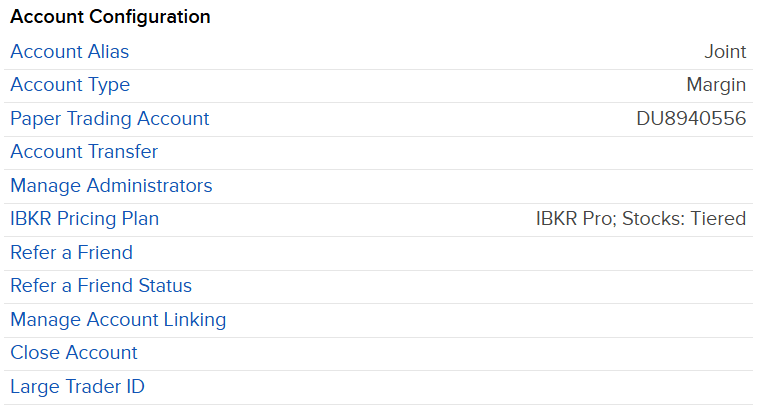
You need to log in to your account and go into the settings. From there, under the account configuration category, you will find the Manage Administrators option.

On this page, you will find the list of administrators of your account. And you can start adding a new one by clicking the plus button. If you are worried about the name administrator, I understand. This name is misleading because they do not have rights to change anything, only to get statements and reports. Administrator here does not mean they have all permissions, like it is on your computer.
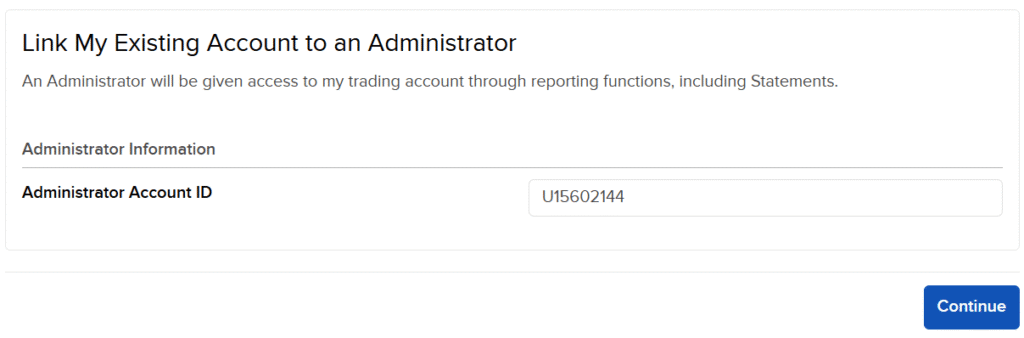
On the next screen, you will need to enter the account information of datalevel, which is U15602144. This is the Interactive Brokers account they use to link together with yours. Once you click Continue, the link will be established. datalevel will then confirm the connection, and you will be good to go. If you go back to the Administrators page, you should see it.

If you want more details to be sure it is correct, you can click on the information button on the left of the name of the company.
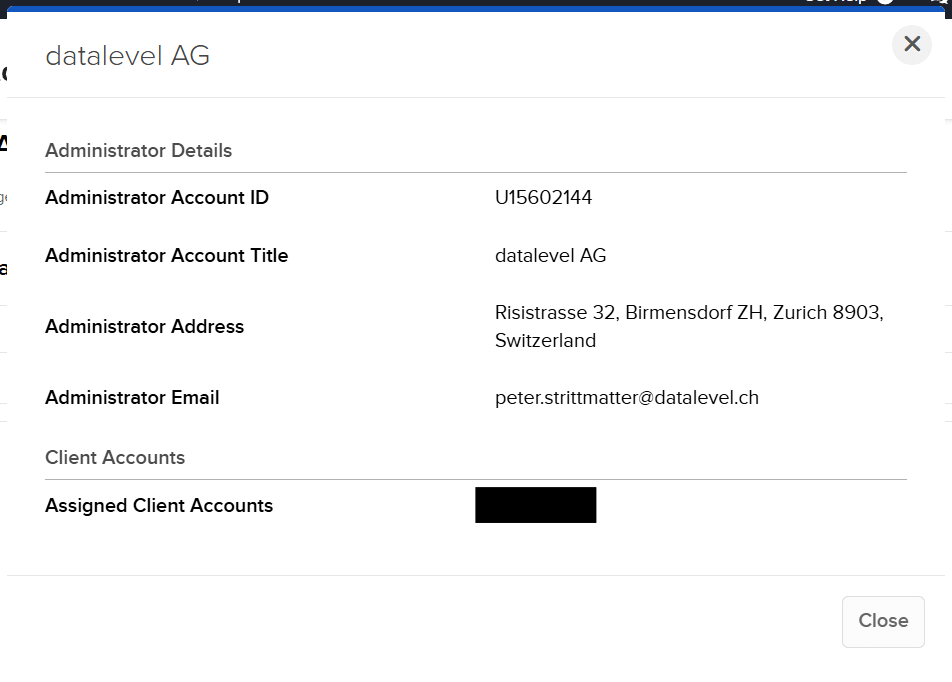
Here you will see all the details of the account. Peter Strittmatter is the CFO and member of the board of datalevel AG and one of the two founders.
At this point, you have done everything already. All you need to do is wait for the e-tax statement to be generated and sent to you.
Pay and download your e-tax statement
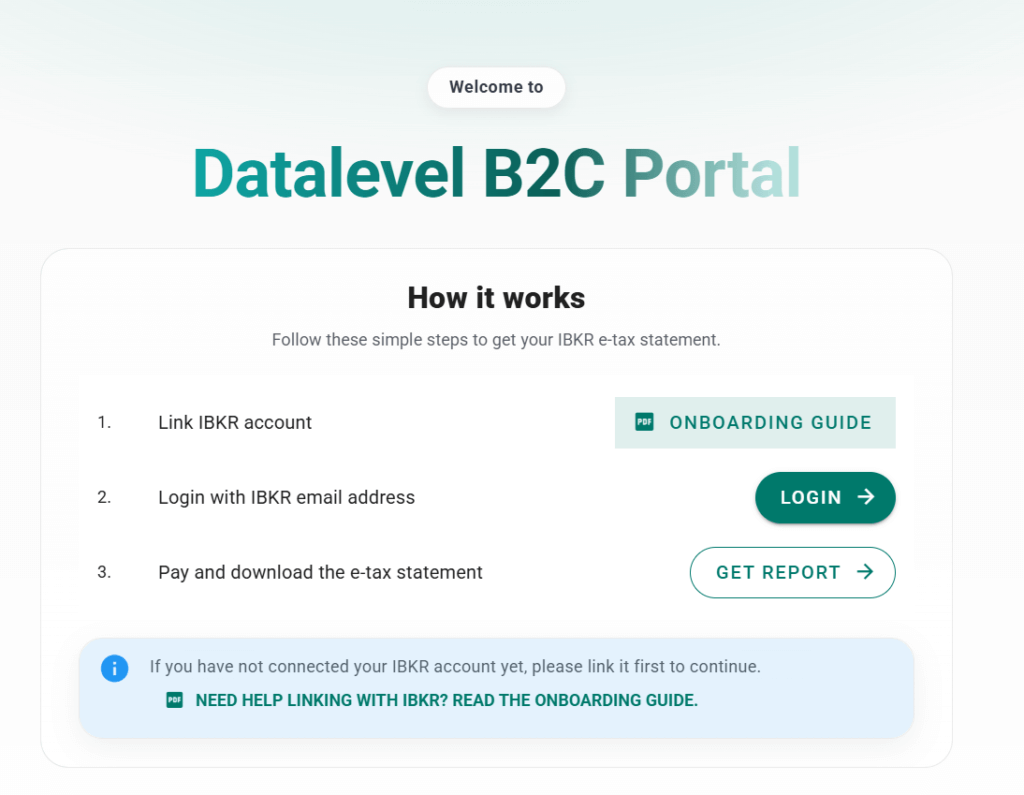
Once the e-tax statement is ready, you should receive an email from Datalevel. In the email, you will get a link to the IBKR Datalevel Portal. You can click on Login, and this will ask you for your email (the same one you are using for IBKR). This will then email you a link to fully log in.
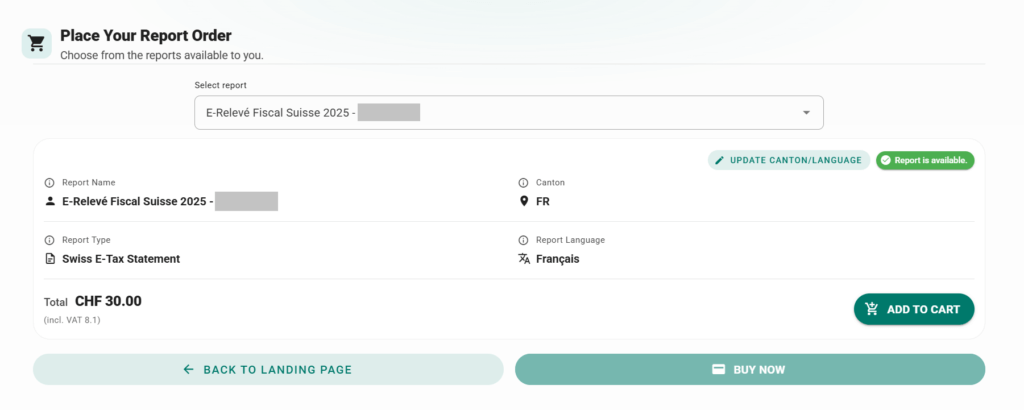
Once you are connected, you will see all your e-tax statements. If you have multiple accounts connected, you will see multiple, but most people, like me, will only see one. You can update the language of the statement and the canton of the statement. Currently, it may take a day to update, but in the future, it will be instant.
For each statement, you can press the add to cart button. Once you are satisfied, you can press the buy now button to finalize your order and pay.
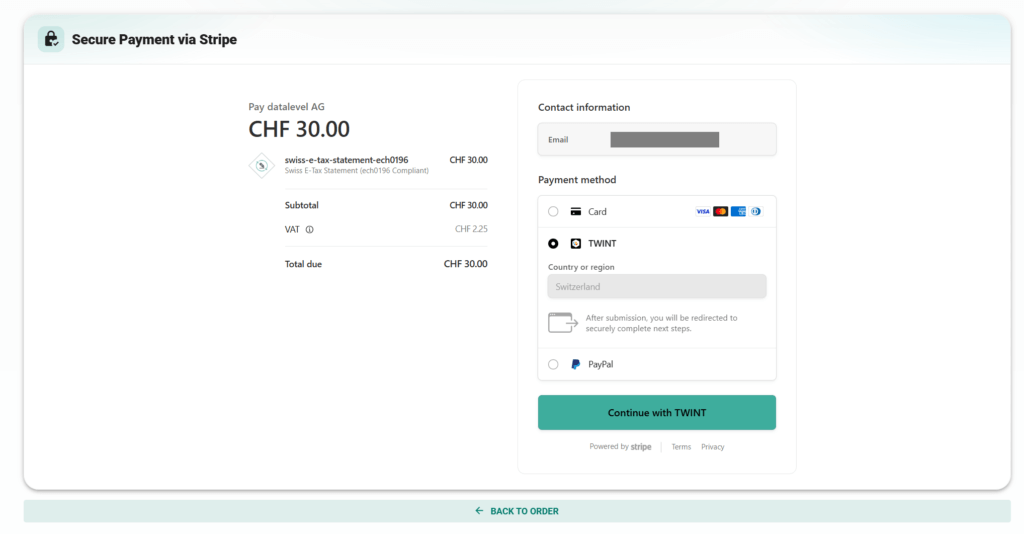
You have multiple options for paying your e-tax statements:
- Pay with a credit card
- Pay with TWINT
- Pay with PayPal
Once you have paid, you will get a confirmation and a link to the purchases page.
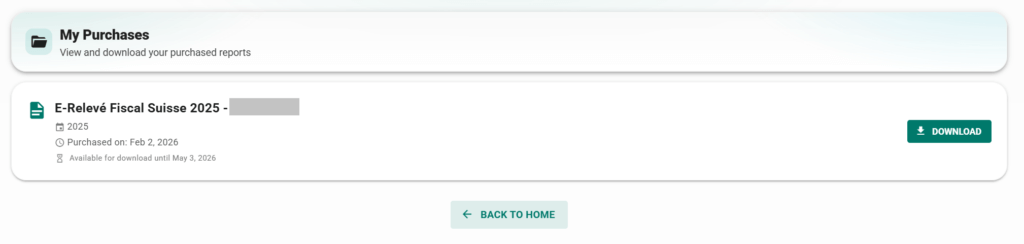
At this point, you have your e-tax statement. You can import it into your tax software and save time by not having to worry about filling everything by hand.
The entire process is quite smooth and only takes a few minutes.
Frequently asked questions
Can I use this e-tax statement with any Swiss tax software?
Yes. E-tax statements are a well-defined standard in Switzerland. Any tax software that supports e-tax statements will support the e-tax statement from datalevel.
Is it safe to link my IBKR account to datalevel?
Yes. The link to IBKR only gives datalevel access to reporting. They can get information, but they cannot change anything or trade.
How much does the e-tax statement cost?
The e-tax statement from datalevel for IBKR costs 50 CHF. If you onboard before December 31st, you only pay 30 CHF per statement.
What to do if you do cannot add administrators to your account?
If you have created your account through a special referral link, you will not be able to add administrators to your account. You can contact the IBKR support and ask them to unlink your account. After that, you will be able to follow the procedure and link datalevel to your account.
Conclusion
I am happy that datalevel is stepping in to provide e-tax statements for Interactive Brokers accounts. For many, the lack of these statements was a big disadvantage of IB.
I also think that the price of 50 CHF (30 CHF if you are early) is quite reasonable. This is cheaper than some Swiss brokers are charging.
In 2026, I am using this service to get an e-tax statement for our Interactive Brokers account. What about you? What do you think about this service?
To learn more, check out the information from datalevel.
If you would like to know more about Swiss taxes, you can read our Swiss taxes guide for securities.
More reading

IBKR Desktop Review 2026
New trading platform. Read our review of the new IBKR Desktop application. Is it easier to use than TWS for buying stocks and ETFs?
Neon Invest vs Swissquote 2026 – Which is the best broker?
Neon Invest vs Swissquote. We compare the fees, ETF limits, and features to help you choose between the low-cost app and the established bank.
Cornèrtrader Review 2026 – Cheap Swiss broker
Honest review of Cornèrtrader, a very affordable Swiss broker: how good is it really? Is it really affordable? We will find out!
Learn easy ways to optimize your finances and save thousands in Switzerland with our exclusive e-book. Learn about the most cost-effective financial services tailored for savvy residents and expats!
Get Your FREE Swiss Money-Saving Guide
The idea that “e-tax statements allow us to fill out our taxes faster by embedding all data in a digital format for import into our tax software” is quite intriguing, especially when considering the complexity of tax laws. As someone who’s had to navigate tax season in multiple countries, I’ve found that having all the necessary documents in one place can save a significant amount of time and hassle. For instance, I’ve made it a habit to keep a detailed record of all my transactions, including those from foreign accounts, as this can help identify any discrepancies and ensure accuracy when filing taxes. The parallel between efficient tax filing systems and multinational corporate structures is something I have been thinking about because it highlights the importance of streamlining financial data, regardless of the context. I wonder, as tax laws continue to evolve, how individual taxpayers can benefit from the same principles that guide large corporations in optimising their financial reporting.
I agree that having all your tax documents ready and well organized is very important and should be done regardless of using e-tax statements or not.
But if you have a hundred transactions, you still need to enter them manually regardless of the documentation you have, saving you time, no?
Does it account for ROC (Return of Capital), so those distributions won’t be classed as Dividend Income?
Hi John Doe
It should, yes. IBKR standard statements include that and datalevel are experts in this field, so they should include it properly. I have no way of testing since I have not add such distributions this year, but I would trust the e-tax statement in this case.
Hey all,
Did everthing in Q4 2025 but still didnt receive anything from Datalevel.
Is that normal?
Thanks all,
M
Hi Maurizio
I think most people should have received it by now.
I would contact them to be sure everything is in order, and you will receive your statement soon.
Hi. A quick question. Does the Datalevel report include the dividends for accummulating ETFs too, not just the distributing ETF dividends? ICTax can overestimate them when the shares are bought throughout the year, by using the end of year total quantity.
Hi
It is supposed to include everything, including accumulating ETFs. That being said, I have none of these, so I can’t validate it.
That’s not overestimating, those ETFs are set with a virtual ex-dividend date towards the end of the year, so the amount of shares you hold then, count.
An e-tax statement does not list dividends for accumulating ETFs, just all your buys and the tax software will determine the dividends for you. There’s no changing that.
Merci Baptiste !
Very usefull because I was trying to input everything in VAUDTAX… It was a nightmare…
Best regards !
J.
I am glad this was useful!
I have found a very interesting alternative, which is fully open source, does not need access to IBKR and is even free. Creating an e-taxstatement for my IBKR account for last year worked like a charm:
https://github.com/vroonhof/opensteuerauszug
For support, there is also discussion on Mustachian Post Forum going on.
Thanks a lot for sharing, Swen, this is really nice! I should have searched for that earlier. It makes sense that one can generate the ECH from the PDF. Definitely a good alternative for DIYers.
Wow, thanks for sharing! This is awesome. It worked just without flaws with my simple VT portfolio after a few minutes setup work. DA1 and everything was correctly populated (ZH).
I almost missed this tool since it is only mentioned in the comments. This tool should definitely be mentioned above in the article as well.
I agree, this tool should be marked prominently in the article! Especially since DataLevel takes about 2 weeks to send the report.
Just note that BONDs are not supported so you either patch the tool or exclude them from the report
When running this against my portfolio:
Error during phase calculate: Negative balance(s) for security ‘XXXXXX’ (category OPTION): -1 on 2026-01-01. Please double-check the data; if you are intentionally holding a short position, see https://github.com/vroonhof/opensteuerauszug/issues/261.
It appears it doesn’t like short positions on Options. I will try the next report solution. According to the FAQ, Datalevel seems to handle Options, let me give it a try :-)
Thanks for the test, Daniel. Please let us know whether that works with Datalevel.
Do you have a post on how to fill-in the tax declaration out of the IBKR native statements without using a third party such as datalevel?
Thanks a lot!
This post should be enough: How to file your taxes with Swiss and foreign securities in 2026
I’m still not clear whether datalevel can provide DA-1, automatically calculating all trades and dividends for US stocks.
They will not provide the DA-1, but the e-tax statement. And the e-tax statement contains the information necessary for the DA-1, so you should have nothing else to do.
Thanks for clarifying. Do you know if this will work if I have two accounts, e.g. personal and joint accounts.
I do not know. That’s a good question.
If you have two primary accounts, you will need to link both to Datalevel.
If you are using sub-accounts, then I am not sure how this will work with datalevel.